Reading CPython Source (3): The list Type
Originally published in Chinese on 2021-05-06; this English edition preserves the original scope and technical context.
In Python, the list type is defined as a struct named PyListObject in the listobject.h file.
// Include/cpython/listobject.h
typedef struct {
    PyObject_VAR_HEAD
    /* Vector of pointers to list elements.  list[0] is ob_item[0], etc. */
    PyObject **ob_item;

    /* ob_item contains space for 'allocated' elements.  The number
     * currently in use is ob_size.
     * Invariants:
     *     0 <= ob_size <= allocated
     *     len(list) == ob_size
     *     ob_item == NULL implies ob_size == allocated == 0
     * list.sort() temporarily sets allocated to -1 to detect mutations.
     *
     * Items must normally not be NULL, except during construction when
     * the list is not yet visible outside the function that builds it.
     */
    Py_ssize_t allocated;
} PyListObject;
Its implementation is similar to std::vector in C++, both maintaining a dynamically allocated array and expanding the array’s capacity dynamically when adding data. The PyListObject structure contains a variable-length object header PyObject_VAR_HEAD, ob_size represents the current length of the dynamic array, **ob_item points to the dynamic array, and allocated is the capacity of the dynamic array. We can find the methods related to the list object from its type pointer PyTypeObject PyList_Type.
// Objects/listobject.c
PyTypeObject PyList_Type = {
    PyVarObject_HEAD_INIT(&PyType_Type, 0)
    "list",
    sizeof(PyListObject),
    list_methods,                               /* tp_methods */
    // ...
};

static PyMethodDef list_methods[] = {
    {"__getitem__", (PyCFunction)list_subscript, METH_O|METH_COEXIST, "x.__getitem__(y) <==> x[y]"},
    LIST___REVERSED___METHODDEF
    LIST___SIZEOF___METHODDEF
    LIST_CLEAR_METHODDEF
    LIST_COPY_METHODDEF
    LIST_APPEND_METHODDEF
    LIST_INSERT_METHODDEF
    LIST_EXTEND_METHODDEF
    LIST_POP_METHODDEF
    LIST_REMOVE_METHODDEF
    LIST_INDEX_METHODDEF
    LIST_COUNT_METHODDEF
    LIST_REVERSE_METHODDEF
    LIST_SORT_METHODDEF
    {"__class_getitem__", (PyCFunction)Py_GenericAlias, METH_O|METH_CLASS, PyDoc_STR("See PEP 585")},
    {NULL,              NULL}           /* sentinel */
};

#define LIST_APPEND_METHODDEF    \
    {"append", (PyCFunction)list_append, METH_O, list_append__doc__},

PyDoc_STRVAR(list_append__doc__,
"append($self, object, /)\n"
"--\n"
"\n"
"Append object to the end of the list.");

#define LIST_COPY_METHODDEF    \
    {"copy", (PyCFunction)list_copy, METH_NOARGS, list_copy__doc__},

PyDoc_STRVAR(list_copy__doc__,
"copy($self, /)\n"
"--\n"
"\n"
"Return a shallow copy of the list.");
In Python, what is referred to as a function is encapsulated into the type PyMethodDef, which includes the function name *ml_name, the corresponding C function implementation ml_meth, the flags for the C function ml_flags, and the function documentation *ml_doc:
// Include/methodobject.h
struct PyMethodDef {
    const char  *ml_name;   /* The name of the built-in function/method */
    PyCFunction ml_meth;    /* The C function that implements it */
    int         ml_flags;   /* Combination of METH_xxx flags, which mostly
                               describe the args expected by the C func */
    const char  *ml_doc;    /* The __doc__ attribute, or NULL */
};
typedef struct PyMethodDef PyMethodDef;
1 append
As described in the list_append__doc__, the purpose of the list_append function is to add new elements to the end of the list:
// Objects/listobject.c
static PyObject *
list_append(PyListObject *self, PyObject *object)
/*[clinic end generated code: output=7c096003a29c0eae input=43a3fe48a7066e91]*/
{
    if (app1(self, object) == 0)
        Py_RETURN_NONE;
    return NULL;
}

static int
app1(PyListObject *self, PyObject *v)
{
    Py_ssize_t n = PyList_GET_SIZE(self);

    assert (v != NULL);
    assert((size_t)n + 1 < PY_SSIZE_T_MAX);
    if (list_resize(self, n+1) < 0)
        return -1;

    Py_INCREF(v);
    PyList_SET_ITEM(self, n, v);
    return 0;
}

static int
list_resize(PyListObject *self, Py_ssize_t newsize)
{
    PyObject **items;
    size_t new_allocated, num_allocated_bytes;
    Py_ssize_t allocated = self->allocated;

    /* Bypass realloc() when a previous overallocation is large enough
       to accommodate the newsize.  If the newsize falls lower than half
       the allocated size, then proceed with the realloc() to shrink the list.
    */
    if (allocated >= newsize && newsize >= (allocated >> 1)) {
        assert(self->ob_item != NULL || newsize == 0);
        Py_SET_SIZE(self, newsize);
        return 0;
    }

    /* This over-allocates proportional to the list size, making room
     * for additional growth.  The over-allocation is mild, but is
     * enough to give linear-time amortized behavior over a long
     * sequence of appends() in the presence of a poorly-performing
     * system realloc().
     * Add padding to make the allocated size multiple of 4.
     * The growth pattern is:  0, 4, 8, 16, 24, 32, 40, 52, 64, 76, ...
     * Note: new_allocated won't overflow because the largest possible value
     *       is PY_SSIZE_T_MAX * (9 / 8) + 6 which always fits in a size_t.
     */
    new_allocated = ((size_t)newsize + (newsize >> 3) + 6) & ~(size_t)3;
    /* Do not overallocate if the new size is closer to overallocated size
     * than to the old size.
     */
    if (newsize - Py_SIZE(self) > (Py_ssize_t)(new_allocated - newsize))
        new_allocated = ((size_t)newsize + 3) & ~(size_t)3;

    if (newsize == 0)
        new_allocated = 0;
    num_allocated_bytes = new_allocated * sizeof(PyObject *);
    items = (PyObject **)PyMem_Realloc(self->ob_item, num_allocated_bytes);
    if (items == NULL) {
        PyErr_NoMemory();
        return -1;
    }
    self->ob_item = items;
    Py_SET_SIZE(self, newsize);
    self->allocated = new_allocated;
    return 0;
}
One can see that in list_append, list_resize is called first, which may perform two operations:
- After adding an element, if the new array size
newsizeis within the range[allocated / 2, allocated](less than the current capacityallocatedand greater than or equal to half of the current capacityallocated >> 1), then the array capacity is shrunk tonewsize; - Otherwise, calculate the new allocated size
new_allocatedas((size_t)newsize + (newsize >> 3) + 6) & ~(size_t)3after appending to the array, and then re-allocate the memory.
Here, the formula in the second step is not intuitive. We can observe the changes of specific values by listing them:
Dynamic Array Length ob_size | Current Capacity allocated | New Length After Append newsize | New Capacity After Append new_allocated |
|---|---|---|---|
| 0 | 0 | 1 | (1 + 0 + 6) & 252 = 111 & 11111100 = 4 |
| 3 | 4 | 4 | 4 ∈ [2, 4](unchanged) |
| 4 | 8 | 5 | (5 + 0 + 6) & 252 = 1011 & 11111100 = 8 |
| 7 | 8 | 8 | 8 ∈ [4, 8](unchanged) |
| 8 | 16 | 9 | (9 + 1 + 6) & 252 = 10000 & 11111100 = 16 |
| 15 | 16 | 16 | 16 ∈ [8, 16] (unchanged) |
| 16 | 16 | 17 | (16 + 2 + 6) & 252 = 10011 & 11111100 = 24 |
One can observe that the capacity is only increased to a larger value when the new length newsize is greater than the current capacity allocated. This value is then padded and rounded up to the next multiple of 4; to verify the calculation in the table using Python, one can use the following test code:
import sys

l = []
s = sys.getsizeof(l)
print((sys.getsizeof(l) - s) // 8)

for _ in range(17):
	l.append(0)
	print("newsize", len(l), "new_allocated", (sys.getsizeof(l) - s) // 8)
$ python3 main.py
newsize 1 new_allocated 4
newsize 2 new_allocated 4
newsize 3 new_allocated 4
newsize 4 new_allocated 4
newsize 5 new_allocated 8
newsize 6 new_allocated 8
newsize 7 new_allocated 8
newsize 8 new_allocated 8
newsize 9 new_allocated 16
newsize 10 new_allocated 16
newsize 11 new_allocated 16
newsize 12 new_allocated 16
newsize 13 new_allocated 16
newsize 14 new_allocated 16
newsize 15 new_allocated 16
newsize 16 new_allocated 16
newsize 17 new_allocated 24
Using Python versions 3.9 and earlier may produce discrepancies when testing with large data sets, as the process for calculating new_allocated has been modified.
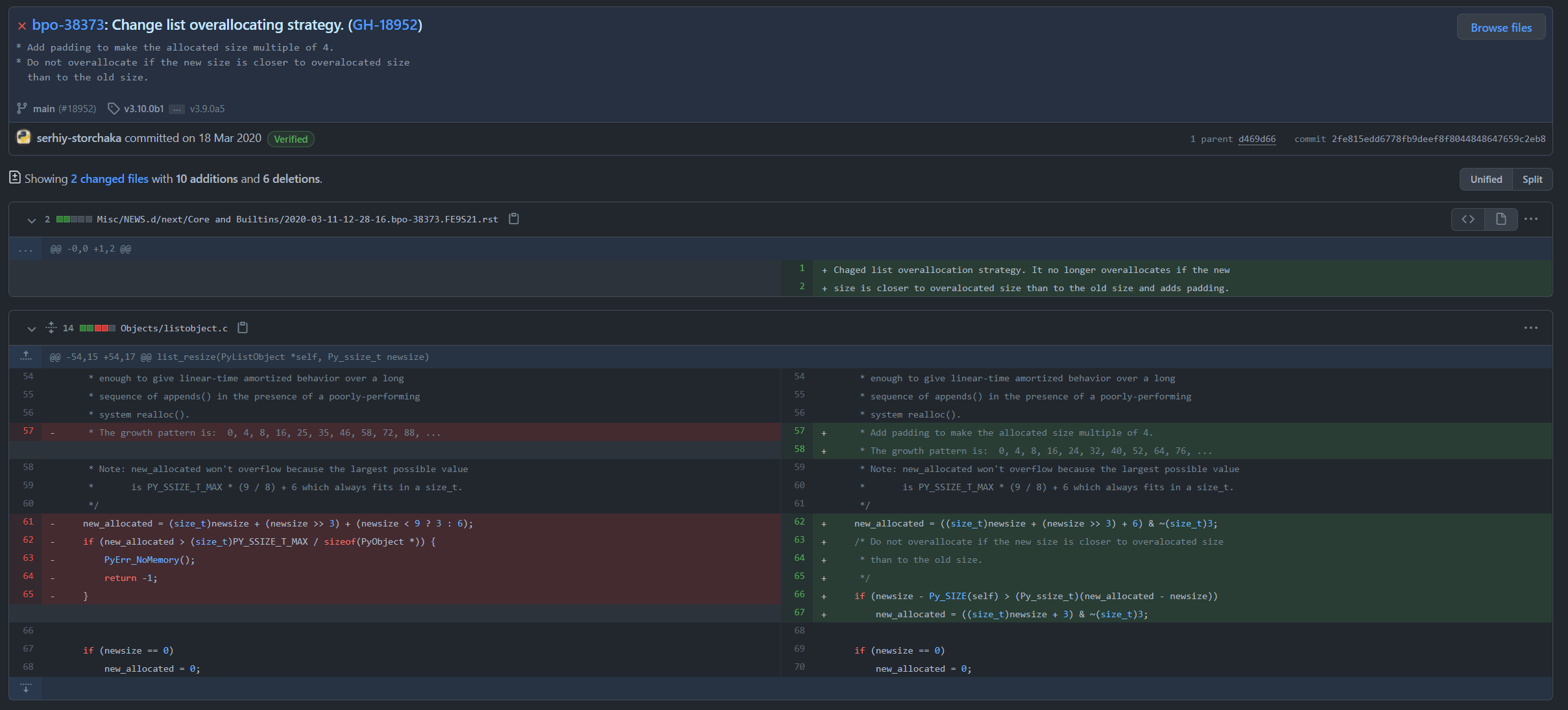
Like std::vector, by amortized analysis, the average time complexity of list_append is O(1).
2 copy
As described in list_copy__doc__, the list_copy function aims to return a shallow copy of the list.
static PyObject *
list_copy(PyListObject *self, PyObject *Py_UNUSED(ignored))
{
    return list_copy_impl(self);
}

static PyObject *
list_copy_impl(PyListObject *self)
{
    return list_slice(self, 0, Py_SIZE(self));
}

static PyObject *
list_slice(PyListObject *a, Py_ssize_t ilow, Py_ssize_t ihigh)
{
    PyListObject *np;
    PyObject **src, **dest;
    Py_ssize_t i, len;
    len = ihigh - ilow;
    np = (PyListObject *) list_new_prealloc(len);
    if (np == NULL)
        return NULL;

    src = a->ob_item + ilow;
    dest = np->ob_item;
    for (i = 0; i < len; i++) {
        PyObject *v = src[i];
        Py_INCREF(v);
        dest[i] = v;
    }
    Py_SET_SIZE(np, len);
    return (PyObject *)np;
}
From the definition of PyListObject, we know that the pointer PyObject **ob_item points to an array of pointers to objects, so in the list_slice function, we simply assign each PyObject pointer in PyListObject *a to PyListObject *np one by one, incrementing its reference count. Any modification to any value in the copied list will reflect on the copied list:
c // Example of copying a list slice void list_slice(PyObject *a, PyObject **np) { // Ensure np is not NULL if (np == NULL) return;
// Increment reference count of the original list
Py_INCREF(a);

// Copy the slice of the list
*np = PyList_GetSlice(a, /* start */ 0, /* stop */ -1, /* step */ 1);
}
Note: The above code is a simplified example and assumes the existence of PyList_GetSlice function, which is not shown here for brevity. The actual implementation may vary based on the specific implementation of PyListObject.
a = [1, True, [1, 2]]
b = a
print(a, b)
a[0], a[1], a[2] = 0, False, [3, 4]
print(a, b)
Here, in C++, b = a generally represents a copy constructor or copy assignment, whereas in Python, it actually calls list_copy:
python def list_copy(a): b = a
$ python3 main.py
[1, True, [1, 2]] [1, True, [1, 2]]
[0, False, [3, 4]] [0, False, [3, 4]]
If you want to perform a deep copy of a list, you can use the copy module’s deepcopy function. This is a Python implementation:
python from copy import deepcopy
original_list = [1, 2, [3, 4]] copied_list = deepcopy(original_list)
def deepcopy(x, memo=None, _nil=[]):
    """Deep copy operation on arbitrary Python objects.

    See the module's __doc__ string for more info.
    """

    if memo is None:
        memo = {}

    d = id(x)
    y = memo.get(d, _nil)
    if y is not _nil:
        return y

    cls = type(x)

    copier = _deepcopy_dispatch.get(cls)
    if copier is not None:
        y = copier(x, memo)
    else:
        if issubclass(cls, type):
            y = _deepcopy_atomic(x, memo)
        else:
            copier = getattr(x, "__deepcopy__", None)
            if copier is not None:
                y = copier(memo)
            else:
    	# ...

    # If is its own copy, don't memoize.
    if y is not x:
        memo[d] = y
        _keep_alive(x, memo) # Make sure x lives at least as long as d
    return y
deepcopy uses _deepcopy_dispatch.get to retrieve the copier for built-in containers, then recursively copies the data within these containers. To prevent certain containers from storing values that include pointers to themselves or contain infinite loops, a memo dictionary is used to track copied data and prevent infinite recursion.
If the container stores custom types of objects, deepcopy retrieves the function __deepcopy__ from the type x via copier = getattr(x, "__deepcopy__", None), and uses this function to generate new objects. This means that we need to implement the __deepcopy__ function to ensure it can be correctly deep-copied. For example, consider a custom directed graph structure:
import copy

class DirectedGraphNode:

    def __init__(self, idx, node_list):
        self.idx = idx
        self.node_list = node_list

    def point_to(self, node):
        self.node_list.append(node)

    def __repr__(self):
        return 'id {}, idx {}, node_list {}'.format(id(self), self.idx, [node.idx for node in self.node_list])

    def __deepcopy__(self, memo):
        print(f"DirectedGraphNode: __deepcopy__ from {repr(self)}")
        if self in memo:
            exist_obj = memo.get(self)
            return exist_obj
        cp_obj = DirectedGraphNode(self.idx, [])
        memo[self] = cp_obj
        for node in self.node_list:
            cp_obj.point_to(copy.deepcopy(node, memo))
        print(f"    copy done, self: {repr(self)}")
        return cp_obj

a = DirectedGraphNode(1, [])
b = DirectedGraphNode(2, [])
a.point_to(b)
b.point_to(a)
print(repr(a))
print(repr(b))

c = copy.deepcopy(a)
print(repr(c))
for node in c.node_list:
    print(repr(node))
In its __deepcopy__ function, we start with one of the nodes and first construct a new node object cp_obj, then recursively deep copy all nodes it points to. If a node is found to have already been copied during the copying process, we directly return exist_obj:
$ python3 main.py
id 139867268624336, idx 1, node_list [2]
id 139867268624240, idx 2, node_list [1]
DirectedGraphNode: __deepcopy__ from id 139867268624336, idx 1, node_list [2]
DirectedGraphNode: __deepcopy__ from id 139867268624240, idx 2, node_list [1]
DirectedGraphNode: __deepcopy__ from id 139867268624336, idx 1, node_list [2]
    copy done, self: id 139867268624240, idx 2, node_list [1]
    copy done, self: id 139867268624336, idx 1, node_list [2]
id 139867268624048, idx 1, node_list [2]
id 139867268623040, idx 2, node_list [1]