Reading CPython Source (2): The int Type
Originally published in Chinese on 2021-03-31; this English edition preserves the original scope and technical context.
In Python, there are six standard data types, which are number, string, list, tuple, set, and dictionary. As already explained, the objects of these types are instances of the PyBaseObject_Type class, which itself is an instance of the PyType_Type class. This article, however, will delve into the implementation of the int type in Python.
Unlike the int type in C and C++, the int type in Python has the characteristic of not overflowing. To illustrate this difference, let’s output the result of multiplying two numbers that are one million in both C and Python:
In C: c #include <stdio.h>
int main() { int a = 1000000; int b = 1000000; int result = a * b; printf("%d\n", result); return 0; }
In Python: python a = 1000000 b = 1000000 result = a * b print(result)
>>> x = 10000000000
>>> print(x)
10000000000
In C, overflows can occur:
printf("%d\n", 1000000 * 1000000);
printf("%u\n", 1000000 * 1000000);
-727379968
3567587328
int Type Storage in Memory
1.1 Memory Structure
Python’s int integer type actually is a PyLongObject structure, defined in the longintrepr.h file.
// Include/object.h
#define PyObject_VAR_HEAD      PyVarObject ob_base;

// Objects/longobject.h
#if PYLONG_BITS_IN_DIGIT == 30
typedef uint32_t digit;
// ...
#elif PYLONG_BITS_IN_DIGIT == 15
typedef unsigned short digit;
// ...
#endif
typedef struct _longobject PyLongObject; /* Revealed in longintrepr.h */

// Include/longintrepr.h
struct _longobject {
    PyObject_VAR_HEAD
    digit ob_digit[1];
};
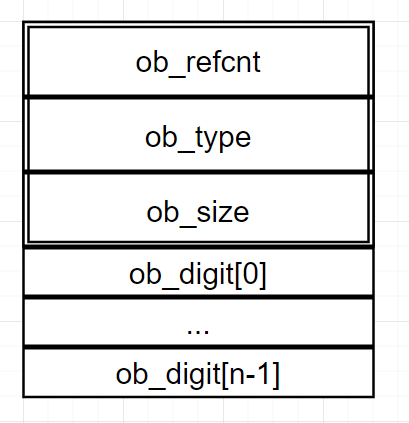
It consists of two parts:
A variable-length object
PyVarObject ob_base, which includes the reference countPy_ssize_t ob_refcnt, the type pointerPyTypeObject *ob_type, and the length of the variable partPy_ssize_t ob_size. This indicates thatPyLongObjectis also a variable-length object;An array of
digittypeob_digitused to store integer values. The array length defaults to 1, and it is expanded if the length is insufficient during initialization. Thedigittype is controlled by thePYLONG_BITS_IN_DIGITmacro during the compilation of the Python interpreter. The value of this macro can be modified to specify its type; if not specified, it defaults to a value determined based on the operating system’s type during compilation. When the pointer occupies more than 8 bytes (for 64-bit and above operating systems),PYLONG_BITS_IN_DIGIT = 30, anddigitisuint32_t. Otherwise,PYLONG_BITS_IN_DIGIT = 15, anddigitisunsigned short.
#ifndef PYLONG_BITS_IN_DIGIT #if SIZEOF_VOID_P >= 8 #define PYLONG_BITS_IN_DIGIT 30 #else #define PYLONG_BITS_IN_DIGIT 15 #endif #endif
`PyLongObject` memory structure is roughly as follows:
### 1.2 Data Representation
In the `ob_digit` array, data representation follows two principles:
`ob_size` represents the absolute length of the `ob_digit` array. When `ob_size` is 0, it indicates that the `PyLongObject` value equals 0; the sign of the data is identified by the sign of `ob_size`, where `ob_size > 0` means `PyLongObject > 0`, and `ob_size < 0` means `PyLongObject < 0`.
2. The `ob_digit` array consists of integers, each of which is at most `2^30` (assuming `PYLONG_BITS_IN_DIGIT == 30`). If an integer exceeds this value, it is zeroed and the next bit is incremented. If the size of the data is `ob_size = n`, then the absolute value of the data equals `ob_digit[0] + ob_digit[1] * 2^30 + ob_digit[2] * 2^60 + ... + ob_digit[n-1] * 2^(30 * (n-1))`.
For the integer 4294967297, it can be represented as `1 + 4 * 2^30`, thus its `ob_size = 2`, `ob_digit[0] = 1`, `ob_digit[1] = 4`. Its memory structure roughly looks like this:
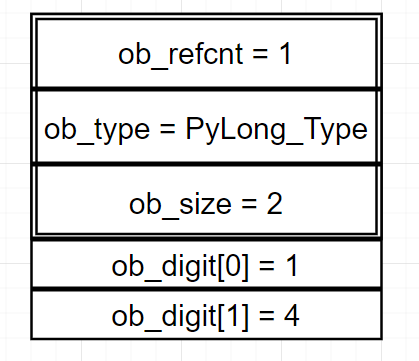
Through this large number storage method, Python solves the overflow issue for numbers less than `2^(30*2147483648) - 1` (where `ob_size` is of type `Py_ssize_t`, defined as `typedef long int Py_ssize_t`) at the language level.
### 1.3 Creating Objects
In Python, the `PyLongObject` object is typically created through the `_PyLong_New` function:
python
def _PyLong_New(ob_size, ob_digit):
# Creating a `PyLongObject` object logic
pass
```cpp
/* Allocate a new int object with size digits.
Return NULL and set exception if we run out of memory. */
#define MAX_LONG_DIGITS \
((PY_SSIZE_T_MAX - offsetof(PyLongObject, ob_digit))/sizeof(digit))
PyLongObject *
_PyLong_New(Py_ssize_t size)
{
PyLongObject *result;
/* Number of bytes needed is: offsetof(PyLongObject, ob_digit) +
sizeof(digit)*size. Previous incarnations of this code used
sizeof(PyVarObject) instead of the offsetof, but this risks being
incorrect in the presence of padding between the PyVarObject header
and the digits. */
if (size > (Py_ssize_t)MAX_LONG_DIGITS) {
PyErr_SetString(PyExc_OverflowError,
"too many digits in integer");
return NULL;
}
result = PyObject_MALLOC(offsetof(PyLongObject, ob_digit) +
size*sizeof(digit));
if (!result) {
PyErr_NoMemory();
return NULL;
}
_PyObject_InitVar((PyVarObject*)result, &PyLong_Type, size);
return result;
}
This function is very simple and does mainly two things:
- Memory checks before and after allocation, including that the parameter
sizecannot exceedMAX_LONG_DIGITS, meaning the integer represented byPyLongObjectcannot exceed2^(30*2147483648) - 1, and error messages generated whenmallocfails to allocate memory space. - Allocate memory for a
PyLongObjectobject, which consists of two parts. The first part is the space occupied byPyVarObjectafter alignment, which isoffsetof(PyLongObject, ob_digit). The second part is the space occupied by theob_digitarray, where the parametersizerepresents the length of theob_digitarray.
1.4 Data Conversion
Every PyLongObject object has a different memory address. We can view the identifier of a variable in Python using the id function, which changes due to different memory addresses:
for i in range(5):
	print(id(i))
$ python3 main.py
139748219328384
139748219328416
139748219328448
139748219328480
139748219328512
It can be seen that the identifiers from 0 to 4 each differ by 32, exactly fitting the space of a PyLongObject, which is 32 bytes, unlike the typical 4-byte or 8-byte space for a long variable in C. This is because all raw data are converted into PyLongObject objects.
There are many methods for data conversion, taking PyLong_FromLong as an example, it converts a long integer type to a PyLongObject object:
// Objects/longobject.c
/* interpreter state */
#define _PY_NSMALLPOSINTS           257
#define _PY_NSMALLNEGINTS           5

#define NSMALLNEGINTS           _PY_NSMALLNEGINTS
#define NSMALLPOSINTS           _PY_NSMALLPOSINTS

#define IS_SMALL_INT(ival) (-NSMALLNEGINTS <= (ival) && (ival) < NSMALLPOSINTS)

PyObject *
PyLong_FromLong(long ival)
{
    PyLongObject *v;
    unsigned long abs_ival;
    unsigned long t;  /* unsigned so >> doesn't propagate sign bit */
    int ndigits = 0;
    int sign;

    if (IS_SMALL_INT(ival)) {
        return get_small_int((sdigit)ival);
    }

    if (ival < 0) {
        /* negate: can't write this as abs_ival = -ival since that
           invokes undefined behaviour when ival is LONG_MIN */
        abs_ival = 0U-(unsigned long)ival;
        sign = -1;
    }
    else {
        abs_ival = (unsigned long)ival;
        sign = ival == 0 ? 0 : 1;
    }

    /* Fast path for single-digit ints */
    if (!(abs_ival >> PyLong_SHIFT)) {
        v = _PyLong_New(1);
        if (v) {
            Py_SET_SIZE(v, sign);
            v->ob_digit[0] = Py_SAFE_DOWNCAST(
                abs_ival, unsigned long, digit);
        }
        return (PyObject*)v;
    }

#if PyLong_SHIFT==15
    /* 2 digits */
    if (!(abs_ival >> 2*PyLong_SHIFT)) {
        v = _PyLong_New(2);
        if (v) {
            Py_SET_SIZE(v, 2 * sign);
            v->ob_digit[0] = Py_SAFE_DOWNCAST(
                abs_ival & PyLong_MASK, unsigned long, digit);
            v->ob_digit[1] = Py_SAFE_DOWNCAST(
                  abs_ival >> PyLong_SHIFT, unsigned long, digit);
        }
        return (PyObject*)v;
    }
#endif

    /* Larger numbers: loop to determine number of digits */
    t = abs_ival;
    while (t) {
        ++ndigits;
        t >>= PyLong_SHIFT;
    }
    v = _PyLong_New(ndigits);
    if (v != NULL) {
        digit *p = v->ob_digit;
        Py_SET_SIZE(v, ndigits * sign);
        t = abs_ival;
        while (t) {
            *p++ = Py_SAFE_DOWNCAST(
                t & PyLong_MASK, unsigned long, digit);
            t >>= PyLong_SHIFT;
        }
    }
    return (PyObject *)v;
}
Although it may seem long, the idea is very simple:
Create a pointer
PyLongObject *zto store the return value, an unsigned long variableabs_ival, and an integertto save the data’s absolute value; an integerndigitsto indicate the array length, and an integersignto indicate the data’s sign;If the data range is within [-5, 257), return the result via the
get_small_intfunction;Obtain the data’s absolute value and its sign;
If the absolute value of the data does not exceed the size of a single element in the
ob_digitarray, return the result via a fast path;For larger data, determine the length of the
ob_digitarray, and then place each position accordingly.
One can notice that in Step 2, special handling was done for small integers within the range [-5, 257). When this function is called, __PyLong_GetSmallInt_internal retrieves the pointer to the integer object via the cached array tstate->interp->small_ints[index]. This small_ints array is a global variable, often referred to as the small integer object pool, which serves to optimize common small integers.
// Objects/longobject.c
static inline PyObject* __PyLong_GetSmallInt_internal(int value)
{
    PyThreadState *tstate = _PyThreadState_GET();
#ifdef Py_DEBUG
    _Py_EnsureTstateNotNULL(tstate);
#endif
    assert(-_PY_NSMALLNEGINTS <= value && value < _PY_NSMALLPOSINTS);
    size_t index = _PY_NSMALLNEGINTS + value;
    PyObject *obj = (PyObject*)tstate->interp->small_ints[index];
    // _PyLong_GetZero() and _PyLong_GetOne() must not be called
    // before _PyLong_Init() nor after _PyLong_Fini()
    assert(obj != NULL);
    return obj;
}
2 Mathematical Operations
The type object of PyLongObject is PyLong_Type, and the member variable PyNumberMethods *tp_as_number of PyLong_Type is initialized with a pointer to the static PyNumberMethods long_as_number* structure, which contains pointers to many function for mathematical operations. When we perform mathematical operations on PyLong_Type, these functions are actually called:
// Objects/longobject.c
PyTypeObject PyLong_Type = {
    // ...
    &long_as_number,                            /* tp_as_number */
    // ...
};

static PyNumberMethods long_as_number = {
    (binaryfunc)long_add,       /*nb_add*/
    (binaryfunc)long_sub,       /*nb_subtract*/
    (binaryfunc)long_mul,       /*nb_multiply*/
    long_mod,                   /*nb_remainder*/
    long_divmod,                /*nb_divmod*/
    long_pow,                   /*nb_power*/
    // ...
};
2.1 Addition
The addition operation for PyLong_Type is implemented by the function long_add, with the relevant macro definitions as follows:
// Objects/longobject.c
#define CHECK_BINOP(v,w)                                \
    do {                                                \
        if (!PyLong_Check(v) || !PyLong_Check(w))       \
            Py_RETURN_NOTIMPLEMENTED;                   \
    } while(0)

/* convert a PyLong of size 1, 0 or -1 to an sdigit */
#define MEDIUM_VALUE(x) (assert(-1 <= Py_SIZE(x) && Py_SIZE(x) <= 1),   \
         Py_SIZE(x) < 0 ? -(sdigit)(x)->ob_digit[0] :   \
             (Py_SIZE(x) == 0 ? (sdigit)0 :                             \
              (sdigit)(x)->ob_digit[0]))

static PyObject *
long_add(PyLongObject *a, PyLongObject *b)
{
    PyLongObject *z;

    CHECK_BINOP(a, b);

    if (Py_ABS(Py_SIZE(a)) <= 1 && Py_ABS(Py_SIZE(b)) <= 1) {
        return PyLong_FromLong(MEDIUM_VALUE(a) + MEDIUM_VALUE(b));
    }
    if (Py_SIZE(a) < 0) {
        if (Py_SIZE(b) < 0) {
            z = x_add(a, b);
            if (z != NULL) {
                /* x_add received at least one multiple-digit int,
                   and thus z must be a multiple-digit int.
                   That also means z is not an element of
                   small_ints, so negating it in-place is safe. */
                assert(Py_REFCNT(z) == 1);
                Py_SET_SIZE(z, -(Py_SIZE(z)));
            }
        }
        else
            z = x_sub(b, a);
    }
    else {
        if (Py_SIZE(b) < 0)
            z = x_sub(a, b);
        else
            z = x_add(a, b);
    }
    return (PyObject *)z;
}
It is implemented quite simply, and the main steps are as follows:
- Create a pointer
PyLongObject *zfor storing the return value; - Check if both parameters are pointers of type
PyLongObject; - If both parameters satisfy
ob_size <= 1(i.e., their absolute values are less than2^30), then first obtain the values[0] values of both usingMEDIUM_VALUE, and add the two numbers directly (which will never overflow). Then, usePyLong_FromLongto wrap this number into aPyLongObjectpointer and return it; typically, the numbers we operate on are not very large, so we can leverage simplified computation steps and CPU branch prediction to improve efficiency. - Determine the positive or negative relationship between them and simplify the problem to absolute value addition/subtraction using auxiliary functions
x_addandx_subfor computation, returning the result.
2.2 Absolute Value Addition
Absolute value addition function x_add is defined as follows:
#if PYLONG_BITS_IN_DIGIT == 30
#define PyLong_SHIFT    30
// ...
#endif
#define PyLong_BASE     ((digit)1 << PyLong_SHIFT)
#define PyLong_MASK     ((digit)(PyLong_BASE - 1))

/* Add the absolute values of two integers. */
static PyLongObject *
x_add(PyLongObject *a, PyLongObject *b)
{
    Py_ssize_t size_a = Py_ABS(Py_SIZE(a)), size_b = Py_ABS(Py_SIZE(b));
    PyLongObject *z;
    Py_ssize_t i;
    digit carry = 0;

    /* Ensure a is the larger of the two: */
    if (size_a < size_b) {
        { PyLongObject *temp = a; a = b; b = temp; }
        { Py_ssize_t size_temp = size_a;
            size_a = size_b;
            size_b = size_temp; }
    }
    z = _PyLong_New(size_a+1);
    if (z == NULL)
        return NULL;
    for (i = 0; i < size_b; ++i) {
        carry += a->ob_digit[i] + b->ob_digit[i];
        z->ob_digit[i] = carry & PyLong_MASK;
        carry >>= PyLong_SHIFT;
    }
    for (; i < size_a; ++i) {
        carry += a->ob_digit[i];
        z->ob_digit[i] = carry & PyLong_MASK;
        carry >>= PyLong_SHIFT;
    }
    z->ob_digit[i] = carry;
    return long_normalize(z);
}
2.3 Absolute Value Subtraction
Implementation of Absolute Value Subtraction is as follows:
/* Subtract the absolute values of two integers. */
static PyLongObject *
x_sub(PyLongObject *a, PyLongObject *b)
{
    Py_ssize_t size_a = Py_ABS(Py_SIZE(a)), size_b = Py_ABS(Py_SIZE(b));
    PyLongObject *z;
    Py_ssize_t i;
    int sign = 1;
    digit borrow = 0;

    /* Ensure a is the larger of the two: */
    if (size_a < size_b) {
        sign = -1;
        { PyLongObject *temp = a; a = b; b = temp; }
        { Py_ssize_t size_temp = size_a;
            size_a = size_b;
            size_b = size_temp; }
    }
    else if (size_a == size_b) {
        /* Find highest digit where a and b differ: */
        i = size_a;
        while (--i >= 0 && a->ob_digit[i] == b->ob_digit[i])
            ;
        if (i < 0)
            return (PyLongObject *)PyLong_FromLong(0);
        if (a->ob_digit[i] < b->ob_digit[i]) {
            sign = -1;
            { PyLongObject *temp = a; a = b; b = temp; }
        }
        size_a = size_b = i+1;
    }
    z = _PyLong_New(size_a);
    if (z == NULL)
        return NULL;
    for (i = 0; i < size_b; ++i) {
        /* The following assumes unsigned arithmetic
           works module 2**N for some N>PyLong_SHIFT. */
        borrow = a->ob_digit[i] - b->ob_digit[i] - borrow;
        z->ob_digit[i] = borrow & PyLong_MASK;
        borrow >>= PyLong_SHIFT;
        borrow &= 1; /* Keep only one sign bit */
    }
    for (; i < size_a; ++i) {
        borrow = a->ob_digit[i] - borrow;
        z->ob_digit[i] = borrow & PyLong_MASK;
        borrow >>= PyLong_SHIFT;
        borrow &= 1; /* Keep only one sign bit */
    }
    assert(borrow == 0);
    if (sign < 0) {
        Py_SET_SIZE(z, -Py_SIZE(z));
    }
    return maybe_small_long(long_normalize(z));
}
Its steps are similar to absolute value addition, and can generally be divided into the following steps:
- Obtain the absolute value of
ob_sizefor two parameters, create a pointer toPyLongObject *zfor storing the returned values. - If
a->ob_size < b->ob_size, then swap them, withahaving the larger value and record the result as negative insign. Ifa->ob_size == b->ob_size, then compare bits from the most significant to the least significant, finding the first position wherea->ob_digit[i] != b->ob_digit[i], and decide whether to swap them and the value ofsign. - Set
z’sob_sizetosize_a; - With the index
i = 0, perform a subtraction operation from left to right on each digit of the two numbers. If the subtrahenda->ob_digit[i]is less than the minuendb->ob_digit[i], borrow1from the next higher digita->ob_digit[i + 1]. In decimal subtraction, borrowing to the next higher digit is10, butdigitis defined astypedef uint32_t digit. The borrow is actually calculated asborrow = a->ob_digit[i] - b->ob_digit[i] - borrow, resulting in2^32 + a->ob_digit[i] - b->ob_digit[i]. To get the correct borrow, we need to perform a bitwise AND operation withPyLong_MASKto get the last 30 bits. This gives us the borrow result, which is stored inz->ob_digit[i]. The borrowborrowhas 2 bits left after a right shift by 30 bits, and a bitwise AND operation with1can determine if there was a borrow for this subtraction operation. Ifsize_a > size_b, the remaining parts ofa->ob_digitneed to be placed intoz->ob_digitusing the same method. - In the result
z, the last element ofob_digitmight be0. Therefore, it is converted into the format defined byPyLongObjectusing thelong_normalizefunction and returned.
One can see that the steps here are almost identical to those of decimal subtraction, which follows the same approach as the big number addition and subtraction in the NOI introductory level.