Reading CPython Source (4): The Compiler and Virtual Machine
Originally published in Chinese on 2021-05-26; this English edition preserves the original scope and technical context.
Python is a language that is generally interpreted before use. We usually download the Python interpreter, CPython, from the official Python website. The source code used in this article are from CPython.
The Python interpreter is composed of a Python Compiler and a Python Virtual Machine. When we execute Python code via the Python command, the Python Compiler compiles the Python code into Python bytecode; subsequently, the Python Virtual Machine reads and executes these bytecode sequentially.
1. Python Compiler
1.1 Code Objects
Python provides an internal function compile, which can compile Python code and generate an object containing bytecode information. For example:
python
compiled_code = compile(“x = 5”, “
The compile function returns a code object, which contains the bytecode and metadata.
# test.py
def Square(a):
    return a * a

print(f"result:\t\t{Square(5)}")

# main.py
f = "test.py"
code_obj = compile(open(f).read(), f, 'exec')
exec(code_obj)
print(f"code_obj:\t{code_obj}")
print(f"type:\t\t{type(code_obj)}")
$ python3 main.py
result:         25
code_obj:       <code object <module> at 0x7f052c156b30, file "test.py", line 1>
type:           <class 'code'>
One can see that the type of the code_obj object is class 'code', which corresponds to the structure PyCodeObject in the source code; the code_obj is the core of the Python virtual machine operations in subsequent steps. It packages information related to the number of parameters, local variables, variable names, and instruction sequences into a structure.
// Include/cpython/code.h

/* Bytecode object */
struct PyCodeObject {
    PyObject_HEAD
    int co_argcount;            /* #arguments, except *args */
    int co_posonlyargcount;     /* #positional only arguments */
    int co_kwonlyargcount;      /* #keyword only arguments */
    int co_nlocals;             /* #local variables */
    int co_stacksize;           /* #entries needed for evaluation stack */
    int co_flags;               /* CO_..., see below */
    int co_firstlineno;         /* first source line number */
    PyObject *co_code;          /* instruction opcodes */
    PyObject *co_consts;        /* list (constants used) */
    PyObject *co_names;         /* list of strings (names used) */
    PyObject *co_varnames;      /* tuple of strings (local variable names) */
    PyObject *co_freevars;      /* tuple of strings (free variable names) */
    PyObject *co_cellvars;      /* tuple of strings (cell variable names) */
    /* The rest aren't used in either hash or comparisons, except for co_name,
       used in both. This is done to preserve the name and line number
       for tracebacks and debuggers; otherwise, constant de-duplication
       would collapse identical functions/lambdas defined on different lines.
    */
    Py_ssize_t *co_cell2arg;    /* Maps cell vars which are arguments. */
    PyObject *co_filename;      /* unicode (where it was loaded from) */
    PyObject *co_name;          /* unicode (name, for reference) */
    PyObject *co_lnotab;        /* string (encoding addr<->lineno mapping) See
                                   Objects/lnotab_notes.txt for details. */
    void *co_zombieframe;       /* for optimization only (see frameobject.c) */
    PyObject *co_weakreflist;   /* to support weakrefs to code objects */
    /* Scratch space for extra data relating to the code object.
       Type is a void* to keep the format private in codeobject.c to force
       people to go through the proper APIs. */
    void *co_extra;

    /* Per opcodes just-in-time cache
     *
     * To reduce cache size, we use indirect mapping from opcode index to
     * cache object:
     *   cache = co_opcache[co_opcache_map[next_instr - first_instr] - 1]
     */

    // co_opcache_map is indexed by (next_instr - first_instr).
    //  * 0 means there is no cache for this opcode.
    //  * n > 0 means there is cache in co_opcache[n-1].
    unsigned char *co_opcache_map;
    _PyOpcache *co_opcache;
    int co_opcache_flag;  // used to determine when create a cache.
    unsigned char co_opcache_size;  // length of co_opcache.
};
1.2 Bytecode
In all these member variables, PyObject *co_code stores the sequence of compiled instructions, which is stored in bytes:
# test.py
def Square(a):
    return a * a

print(f"result:\t\t{Square(5)}")

# main.py
f = "test.py"
code_obj = compile(open(f).read(), f, 'exec')
print(f"code obj:\t{code_obj}")
print(f"stack size:\t{code_obj.co_stacksize}")
result = exec(code_obj)
bytecode = code_obj.co_code
print(f"bytecode:\t{bytecode}")
$ python3 main.py
code obj:       <code object <module> at 0x7f26cea5ab30, file "test.py", line 1>
stack size:     4
result:         25
bytecode:       b'd\x00d\x01\x84\x00Z\x00e\x01d\x02e\x00d\x03\x83\x01\x9b\x00\x9d\x02\x83\x01\x01\x00d\x04S\x00'
We can use the built-in Python module dis to decompile these bytecode into a format resembling assembly language:
python import dis
Example function
def example_function(): return 42
Disassemble the bytecode
dis.dis(example_function)
Output:
4 def example_function(): 5 return 42 6 7 # Disassembly: 8 0 LOAD_CONST 1 (‘42’,) 9 3 RETURN_VALUE
Note: The actual output may vary based on the specific bytecode and function.
import dis
dis.dis(bytecode)
          0 LOAD_CONST               0 (0)
          2 LOAD_CONST               1 (1)
          4 MAKE_FUNCTION            0
          6 STORE_NAME               0 (0)
          8 LOAD_NAME                1 (1)
         10 LOAD_CONST               2 (2)
         12 LOAD_NAME                0 (0)
         14 LOAD_CONST               3 (3)
         16 CALL_FUNCTION            1
         18 FORMAT_VALUE             0
         20 BUILD_STRING             2
         22 CALL_FUNCTION            1
         24 POP_TOP
         26 LOAD_CONST               4 (4)
         28 RETURN_VALUE
In the output of the decompiled results, the first column represents the offset of each instruction in the bytecode; the second column represents the mnemonics of each instruction, which can be very helpful in understanding the events that the Python virtual machine will execute in subsequent steps; and the third column represents the operands of each instruction.
Simultaneously, in the hexadecimal representation corresponding to the bytecode, each digit represents different mnemonics and operands. We can directly view the content of the bytecode’s hexadecimal representation by printing it:
print(bytecode.hex())
64 00 64 01 84 00 5a 00 65 01 64 02 65 00 64 03 83 01 9b 00 9d 02 83 01 01 00 64 04 53 00
Above, at the offset == 0 location, we find the number 64, which is the opcode for the LOAD_CONST mnemonic, followed by its operand opargs == 0. The instruction on the fourth line, with an offset == 6, shows STORE_NAME mnemonic with opcode == 5a and opargs == 0. This pattern continues.
The opcode module in Python provides information about mnemonics and opcodes in the Python virtual machine, and the relevant definitions can also be found in the source code’s Include/opcode.h.
import opcode
print(opcode.opname[0x64])
print(opcode.opname[0x5a])
print(opcode.opmap['LOAD_NAME'])
print(opcode.opmap['RETURN_VALUE'])
LOAD_CONST
STORE_NAME
101
83
1.3 Compilation Principles
The implementation of a Python compiler is similar to other languages, containing steps such as lexical analysis Lexical, syntax analysis Syntax Analysis, and semantic analysis Semantic Analysis. This article does not elaborate on the compilation principles.
2 Python Virtual Machine
Like x86-64, ARM platforms, and Java virtual machines, the Python virtual machine is stack-based. Function calls are implemented through call stack call stack and stack frames stack frame.
2.1 Call Stack
The call stack is a region of memory in the CPU register space. It is a FILO data structure that allows insertion or deletion operations on one side of the stack as the top and the other side as the bottom. For the common x86-64 architecture, the stack address space grows from top to bottom:
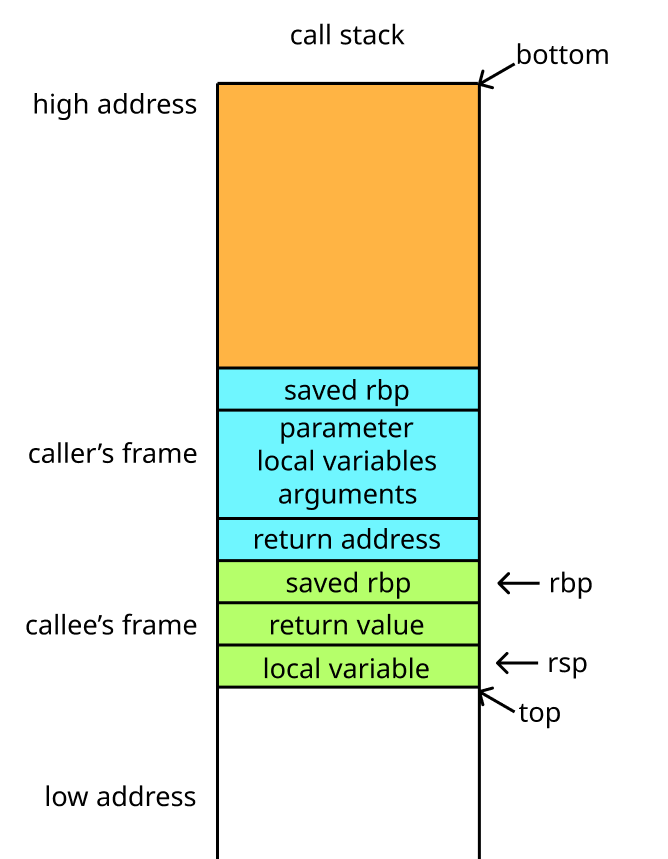
On the x86-64 platform, it has 16 general-purpose registers. These registers are integrated into the CPU chip. The rbp register saves the bottom of the current stack frame (the position at the beginning of the function call), and the rsp register saves the top of the current stack frame (the position of the function execution). The space between rbp and rsp is called the stack frame stack frame for the current function call; each time a function call occurs, a separate stack frame is maintained on the call stack to store information such as the return value, parameters, and local variables of the function; the functions of the other general-purpose registers are as follows.
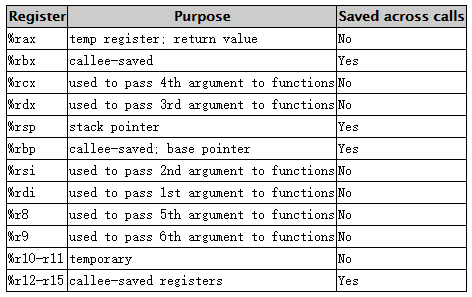
The most common operations related to the stack include push and pop. The push operation inserts an operand into the top of the stack, which involves two steps: first, saving the address stored in the rsp register by subtracting 8 from it, and then writing the operand to this address; The pop operation is the opposite, first extracting data from the address stored in the rsp register, writing it to other registers, and then adding 8 to this address. Here’s an example of a simple Swap function to debug; all assembly language used here is in AT&T Syntax:
python def swap(x, y): # ASCII diagram of the function # ┌───┐ ┌───┐ # │ x │ └───┘ # └───┘ # ┌───┐ ┌───┐ # │ y │ └───┘ # └───┘ # ┌───┐ ┌───┐ # │ t │ ┌───┘ # └───┘ └───┘ # ┌───┐ ┌───┐ # │ x │ ┌───┘ # └───┘ ┌───┘ # ┌───┐ ┌───┐ # │ y │ ┌───┘ # └───┘ ┌───┘ # ┌───┐ ┌───┐ # │ t │ ┌───┘ # └───┘ ┌───┘ # ┌───┐ ┌───┐ # │ x │ ┌───┘ # └───┘ ┌───┘ #
// main.cpp
#include <iostream>

using namespace std;

void Swap(int& a, int &b)
{
    int c = a;
    a = b;
    b = c;
}

int main()
{
    int a = 5, b = 9;
    Swap(a, b);
    cout << a << ' ' << b << endl;
    return 0;
}
Use gdb to open a breakpoint at the main function; within the main function stack frame, constants are copied to memory via the movl instruction.
$ g++ -g -O0 -o main main.cpp
$ gdb main
(gdb) b main
(gdb) r
(gdb) layout reg
0x400852 <main()+9>      movl  $0x5,-0x14(%rbp)  # Place constant 9 at -0x14(%rbp)
0x400859 <main()+16>     movl  $0x9,-0x18(%rbp)  # Place constant 5 at -0x18(%rbp)
In preparation for calling the Swap function, the two parameters are respectively stored in the rdi and rsi registers:
  0x400860 <main()+23>     lea   -0x18(%rbp),%rdx
  0x400864 <main()+27>     lea   -0x14(%rbp),%rax
  0x400868 <main()+31>     mov    %rdx,%rsi
  0x40086b <main()+34>     mov    %rax,%rdi
> 0x40086e <main()+37>     callq  0x40081d <Swap(int&, int&)>

(gdb) p *$rsi
$6 = 9
(gdb) p *$rdi
$7 = 5
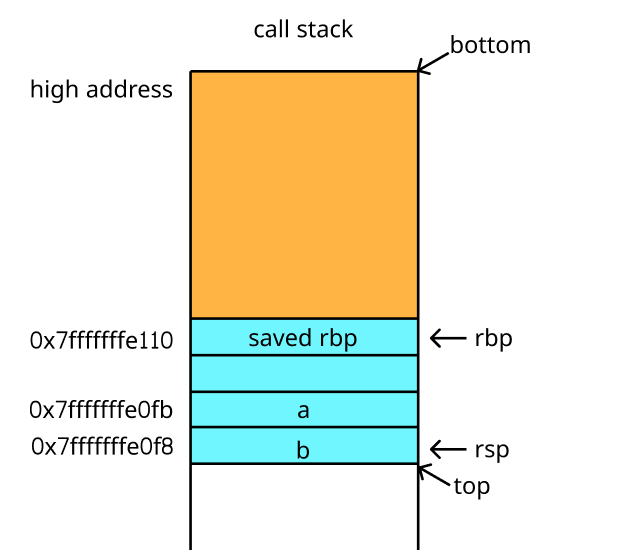
In the callq instruction, stepping into the Swap function reveals that the rbp and rsp pointers still point to the bottom and top of the stack frame in the main function, respectively. This allows us to observe that the stack address space grows downward:
> 0x40086e <main()+37>     callq  0x40081d <Swap(int&, int&)>

(gdb) si

> 0x40081d <Swap(int&, int&)>     push   %rbp
  0x40081e <Swap(int&, int&)+1>   mov    %rsp,%rbp

rbp            0x7fffffffe110   0x7fffffffe110
rsp            0x7fffffffe0e8   0x7fffffffe0e8
The approximate stack-frame structure is shown below:
Execute the next push instruction to store the value of rbp into the stack top, and you will see that the value of rsp has changed:
(gdb) ni

  0x40081d <Swap(int&, int&)>     push   %rbp
> 0x40081e <Swap(int&, int&)+1>   mov    %rsp,%rbp

rbp            0x7fffffffe110   0x7fffffffe110
rsp            0x7fffffffe0e0   0x7fffffffe0e0
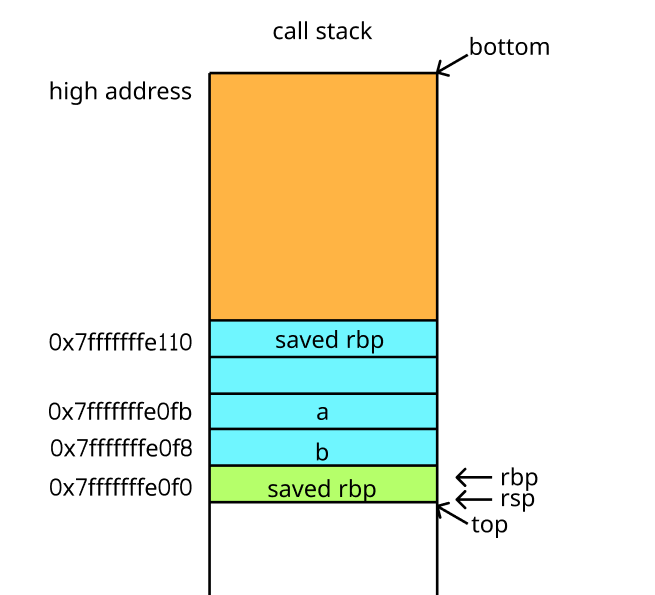
Continuing with the next mov instruction, resetting the value of rbp, entering a new stack frame:
(gdb) ni

rbp            0x7fffffffe0e0   0x7fffffffe0e0
rsp            0x7fffffffe0e0   0x7fffffffe0e0
Here is the stack frame structure now:
After a series of mov instructions, swap the values of a and b. Following the execution of the next pop instruction, write the stored previous frame pointer address into rbp, and modify rsp. Subsequently, execute the retq instruction to continue running the next assembly instruction of the main function.
> 0x400847 <Swap(int&, int&)+42>  pop    %rbp
  0x400848 <Swap(int&, int&)+43>  retq

rbp            0x7fffffffe0e0   0x7fffffffe0e0
rsp            0x7fffffffe0e0   0x7fffffffe0e0

(gdb) ni

  0x400847 <Swap(int&, int&)+42>  pop    %rbp
> 0x400848 <Swap(int&, int&)+43>  retq

rbp            0x7fffffffe110   0x7fffffffe110
rsp            0x7fffffffe0e8   0x7fffffffe0e8
2.2 Stack Frame Objects
In Python, similar to the x86-64 platform, but the code blocks and stack frames are encapsulated separately.
2.2.1 Stack Frame Objects
In Python, the PyCodeObject contains only the bytecode-related information and lacks the context information needed for executing the bytecode. Therefore, a stack frame object PyFrameObject is introduced to serve as the container for running the code object and to simulate stack frames on other platforms.
// cpython/Include/frameobject.h
struct _frame {
    PyObject_VAR_HEAD
    struct _frame *f_back;      /* previous frame, or NULL */
    PyCodeObject *f_code;       /* code segment */
    PyObject *f_builtins;       /* builtin symbol table (PyDictObject) */
    PyObject *f_globals;        /* global symbol table (PyDictObject) */
    PyObject *f_locals;         /* local symbol table (any mapping) */
    PyObject **f_valuestack;    /* points after the last local */
    PyObject *f_trace;          /* Trace function */
    int f_stackdepth;           /* Depth of value stack */
    char f_trace_lines;         /* Emit per-line trace events? */
    char f_trace_opcodes;       /* Emit per-opcode trace events? */

    /* Borrowed reference to a generator, or NULL */
    PyObject *f_gen;

    int f_lasti;                /* Last instruction if called */
    /* Call PyFrame_GetLineNumber() instead of reading this field
       directly.  As of 2.3 f_lineno is only valid when tracing is
       active (i.e. when f_trace is set).  At other times we use
       PyCode_Addr2Line to calculate the line from the current
       bytecode index. */
    int f_lineno;               /* Current line number */
    int f_iblock;               /* index in f_blockstack */
    PyFrameState f_state;       /* What state the frame is in */
    PyTryBlock f_blockstack[CO_MAXBLOCKS]; /* for try and loop blocks */
    PyObject *f_localsplus[1];  /* locals+stack, dynamically sized */
};

// cpython/Include/pyframe.h
typedef struct _frame PyFrameObject;
One can see that the stack frame object contains the following data, which constitutes the entire context required for the Python virtual machine to execute the current stack frame:
The pointer to the previous frame object,
_frame *f_back; In the Python virtual machine, all the frame objects that are running together form the frame stack, wheref_back == NULLonly exists for the initial frame;The pointer to the code object,
PyCodeObject *f_code, contains the bytecode information for the code being executed by the current frame stack object;The stack structure
PyObject **f_valuestackis used during code execution to read data from the top of the stack and store the result at the top of the stack. The size of this stack structuref_valuestackis determined by the stack size specified in the corresponding code objectf_code;The depth of the stack structure used during code execution is
int f_stackdepth;The index of the last executed byte code instruction is stored in
int f_lasti, similar to theripregister.Pointer to the internal namespace, global namespace, and local namespace
PyObject *f_builtins,PyObject *f_globals,PyObject *f_locals. These are structures used to implement the mapping from symbols to objects in Python, typically implemented using a dictionary; discussion on this is deferred.Python function pointer
PyObject *f_traceand related datachar f_trace_lines,char f_trace_opcodesare used for tracking code execution;PyObject *f_genfor executing generator code; these are not discussed.
Python’s sys module provides the _getframe function to retrieve a stack frame object; using a simple Swap function as an example, printing the information of the stack frame at the deepest function call:
python
import sys
def swap(x, y): x, y = y, x return x, y
def print_frame_info(): frame = sys._getframe() print(f"f_back: {frame.f_back}") print(f"f_code: {frame.f_code}") print(f"f_valuestack: {frame.f_valuestack}") print(f"f_stackdepth: {frame.f_stackdepth}") print(f"f_lasti: {frame.f_lasti}") print(f"f_builtins: {frame.f_builtins}") print(f"f_globals: {frame.f_globals}") print(f"f_locals: {frame.f_locals}") print(f"f_trace: {frame.f_trace}") print(f"f_trace_lines: {frame.f_trace_lines}") print(f"f_trace_opcodes: {frame.f_trace_opcodes}") print(f"f_gen: {frame.f_gen}")
Example Callout
swap(1, 2) print_frame_info()
import sys

def Swap(a, b):
    frame = sys._getframe()
    while frame is not None:
        print(f"frame:\t{frame}")
        print(f"name:\t{frame.f_code.co_name}")
        print(f"locals:\t{frame.f_locals.keys()}\n")
        print(f"back:\t{frame.f_back}\n")
        frame = frame.f_back

    return b, a

def main():
    a, b = 5, 9
    a, b = Swap(a, b)
    print(a, b)

if __name__ == "__main__":
    main()
Running the Python program creates a stack frame object called module when execution begins; each time a function is called, the f_back pointer saves the address of the previous execution stack frame, which is pushed onto the stack top when entering other functions.
$ python3 main.py
frame:  <frame at 0x7fe37d7e5900, file '/main.py', line 36, code Swap>
name:   Swap
locals: dict_keys(['a', 'b', 'frame'])
back:   <frame at 0x7fe71ca65040, file '/main.py', line 46, code main>

frame:  <frame at 0x7fe376115040, file '/main.py', line 46, code main>
name:   main
locals: dict_keys(['a', 'b'])
back:   <frame at 0x141f6f0, file '/main.py', line 50, code <module>>

frame:  <frame at 0x1ade6f0, file '/main.py', line 50, code <module>>
name:   <module>
locals: dict_keys(['__name__', '__doc__', '__package__', '__loader__', '__spec__', '__annotations__', '__builtins__', '__file__', '__cached__', 'sys', 'Swap', 'main'])
back:   None

9 5
2.2.1 Recycling and Allocation
Previous sections discussed type objects, and from the example of obtaining a frame object with sys._getframe(), we can see that the type name of the frame object is frame. We can find its type object to be PyFrame_Type. We can find the related operations by looking at the function pointer used to initialize the type object:
PyTypeObject PyFrame_Type = {
    PyVarObject_HEAD_INIT(&PyType_Type, 0)
    "frame",
    sizeof(PyFrameObject),
    sizeof(PyObject *),
    (destructor)frame_dealloc,                  /* tp_dealloc */
    0,                                          /* tp_vectorcall_offset */
    0,                                          /* tp_getattr */
    0,                                          /* tp_setattr */
    0,                                          /* tp_as_async */
    (reprfunc)frame_repr,                       /* tp_repr */
    0,                                          /* tp_as_number */
    0,                                          /* tp_as_sequence */
    0,                                          /* tp_as_mapping */
    0,                                          /* tp_hash */
    0,                                          /* tp_call */
    0,                                          /* tp_str */
    PyObject_GenericGetAttr,                    /* tp_getattro */
    PyObject_GenericSetAttr,                    /* tp_setattro */
    0,                                          /* tp_as_buffer */
    Py_TPFLAGS_DEFAULT | Py_TPFLAGS_HAVE_GC,/* tp_flags */
    0,                                          /* tp_doc */
    (traverseproc)frame_traverse,               /* tp_traverse */
    (inquiry)frame_tp_clear,                    /* tp_clear */
    0,                                          /* tp_richcompare */
    0,                                          /* tp_weaklistoffset */
    0,                                          /* tp_iter */
    0,                                          /* tp_iternext */
    frame_methods,                              /* tp_methods */
    frame_memberlist,                           /* tp_members */
    frame_getsetlist,                           /* tp_getset */
    0,                                          /* tp_base */
    0,                                          /* tp_dict */
};
The function that performs destructor on the stack frame object is frame_dealloc, which is omitted here.
#define PyFrame_MAXFREELIST 200

static void _Py_HOT_FUNCTION
frame_dealloc(PyFrameObject *f)
{
    // ...
    Py_XDECREF(f->f_back);
    Py_DECREF(f->f_builtins);
    Py_DECREF(f->f_globals);
    Py_CLEAR(f->f_locals);
    Py_CLEAR(f->f_trace);

    PyCodeObject *co = f->f_code;
    if (co->co_zombieframe  == NULL) {
        co->co_zombieframe = f;
    }
    else {
        struct _Py_frame_state *state = get_frame_state();
#ifdef Py_DEBUG
        // frame_dealloc() must not be called after _PyFrame_Fini()
        assert(state->numfree != -1);
#endif
        if (state->numfree < PyFrame_MAXFREELIST) {
            ++state->numfree;
            f->f_back = state->free_list;
            state->free_list = f;
        }
        else {
            PyObject_GC_Del(f);
        }
    }

    Py_DECREF(co);
    Py_TRASHCAN_SAFE_END(f)
}


struct _Py_frame_state {
    PyFrameObject *free_list;
    /* number of frames currently in free_list */
    int numfree;
};
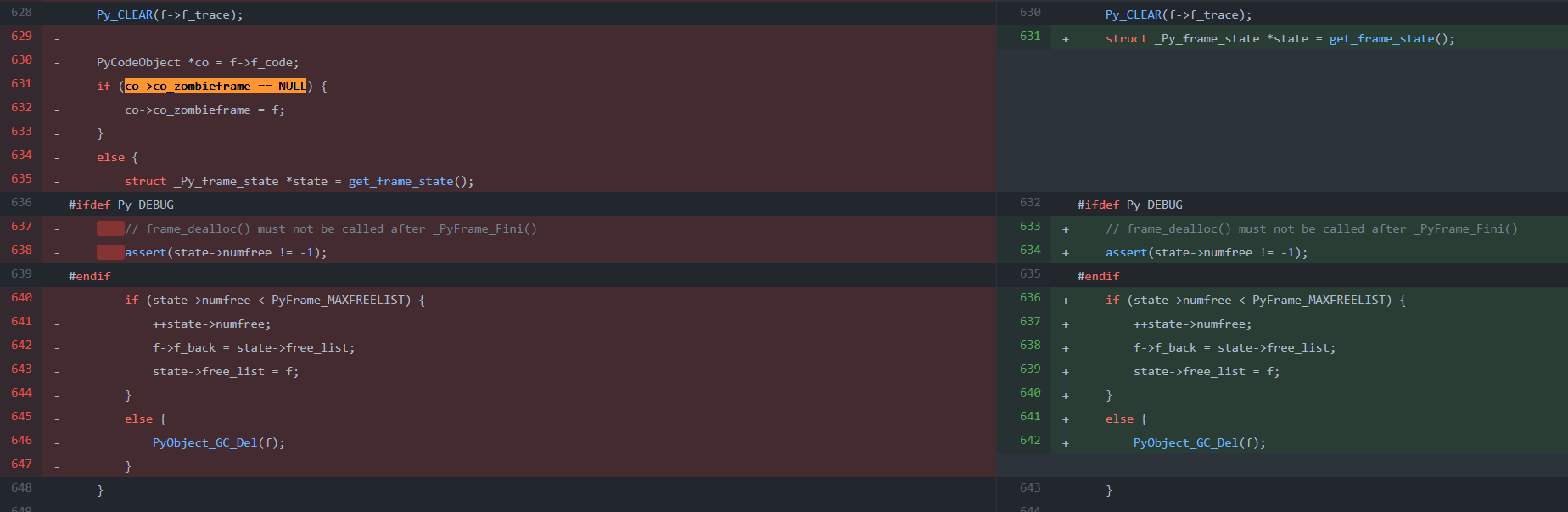
This is a highly frequent function (called almost every time a stack frame exits), so some strategies are employed to minimize the overhead of function calls; one of these strategies involves checking if the stack frame object f is null before its first deallocation, if (co->co_zombieframe == NULL); if so, the stack frame object f is saved in the pointer co->co_zombieframe of the code object co, so that subsequent executions of the same code object co do not require the allocation of the stack frame object f (unless the code object co is collected due to its reference count dropping to zero). For the stack frame object, only the members ob_type, ob_size, f_code, and f_valuestack are retained, as these members are unrelated to other objects. The pointers f_locals, f_trace, f_exc_type, etc., are cleared to NULL by Py_CLEAR, as objects referenced by these pointers might be reclaimed through other means, leading to dangling pointer issues.
Another optimization strategy is when the member pointer co->co_zombieframe of the code object co is not null, indicating that the same stack frame is being executed again. In this case, the stack frame object is stored in the thread-managed free list state->free_list. If a new stack frame object is defined, it can be directly retrieved from the free list state->free_list to avoid the allocation and deallocation of memory. This can be seen in the frame_alloc function.
static inline PyFrameObject*
frame_alloc(PyCodeObject *code)
{
    // ...
    if (state->free_list == NULL)
    {
        f = PyObject_GC_NewVar(PyFrameObject, &PyFrame_Type, extras);
        if (f == NULL) {
            return NULL;
        }
    }
    else {
#ifdef Py_DEBUG
        // frame_alloc() must not be called after _PyFrame_Fini()
        assert(state->numfree != -1);
#endif
        assert(state->numfree > 0);
        --state->numfree;
        f = state->free_list;
        state->free_list = state->free_list->f_back;
        if (Py_SIZE(f) < extras) {
            PyFrameObject *new_f = PyObject_GC_Resize(PyFrameObject, f, extras);
            if (new_f == NULL) {
                PyObject_GC_Del(f);
                return NULL;
            }
            f = new_f;
        }
        _Py_NewReference((PyObject *)f);
    }
    // ...
}
One can see that during the allocation of stack frame objects, one first checks if the free list state->free_list is empty. If it is not empty, then an already allocated stack frame object is taken from its head of the linked list and assigned to it.
This optimization (saving unused stack frame objects in a stack frame list and reusing them when creating other stack frame objects) conflicts with the previous approach (saving stack frame objects with code objects upon stack frame exit and reusing them when executing the same code object). Therefore, the latter was removed in the latest commit of PR 26076.
2.3 Operation Process
2.3.1 Call Flow
Python’s main function is located in cpython/Programs/python.c file. This implementation is relatively simple, and its call chain can be summarized as follows:
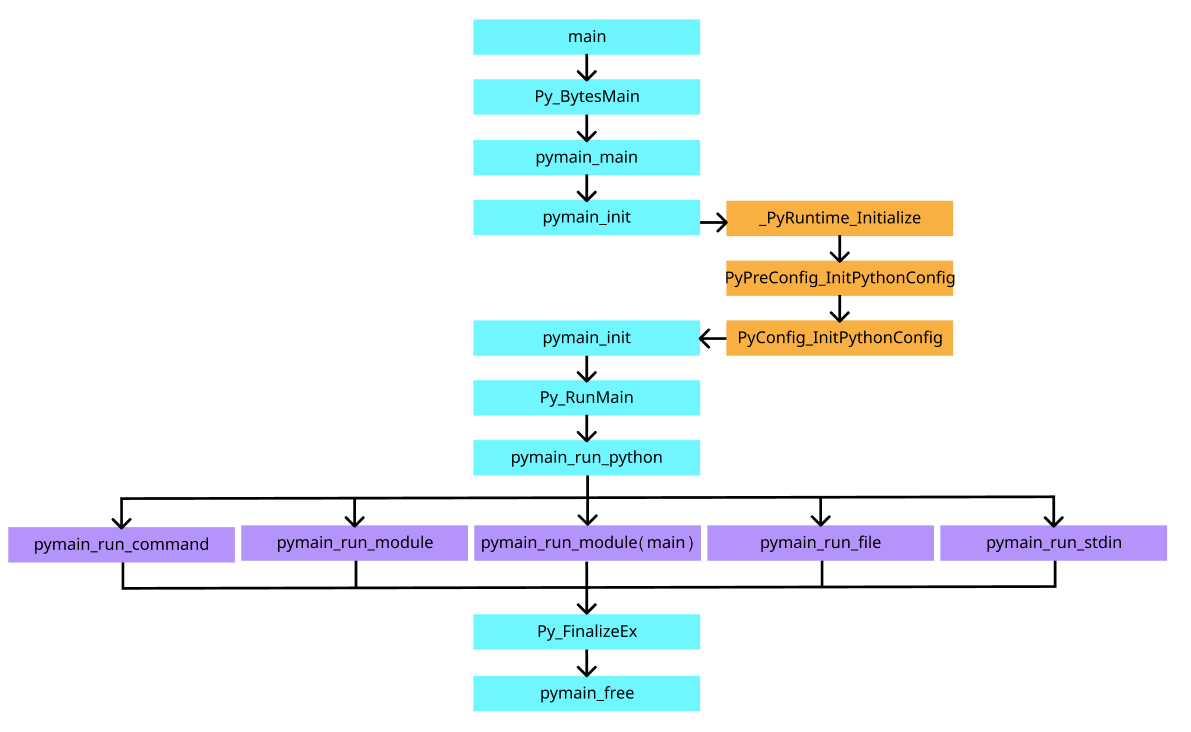
From the call chain, it is observed that configuration is read and initialized before the actual Python code execution. These configurations are saved into the cpython/Include/cpython/initconfig.h file’s PyConfig structure, which contains environmental variables and runtime modes for the Python runtime. The five branches following the pymain_run_python function in the call chain represent the five modes in which Python is run via command line, file, or standard input. Regardless of the mode, execution ultimately proceeds through the run_eval_code_obj function and PyEval_EvalCode function to execute compiled code objects, which is one of the entry points for the Python virtual machine to execute instructions.
2.3.2 Stack Frame Execution
Stack frame execution.
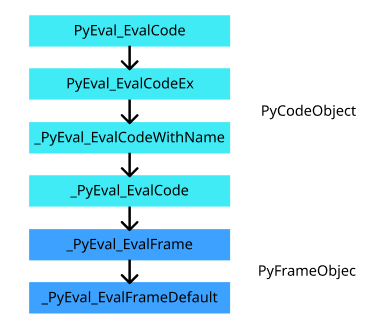
In the Python virtual machine, the entry for executing instructions is PyEval_EvalCode and PyEval_EvalCodeEx. The former is simpler than the latter, as it omits some parameters by only passing the code object, global variables, and local variables as parameters, with all other parameters set to NULL.
// cpython/Python/eval.h
PyAPI_FUNC(PyObject *) PyEval_EvalCode(PyObject *, PyObject *, PyObject *);

PyAPI_FUNC(PyObject *) PyEval_EvalCodeEx(PyObject *co,
                                         PyObject *globals,
                                         PyObject *locals,
                                         PyObject *const *args, int argc,
                                         PyObject *const *kwds, int kwdc,
                                         PyObject *const *defs, int defc,
                                         PyObject *kwdefs, PyObject *closure);

// cpython/Python/ceval.c
PyObject *
PyEval_EvalCode(PyObject *co, PyObject *globals, PyObject *locals)
{
    return PyEval_EvalCodeEx(co,
                      globals, locals,
                      (PyObject **)NULL, 0,
                      (PyObject **)NULL, 0,
                      (PyObject **)NULL, 0,
                      NULL, NULL);
}
While PyEval_EvalCodeEx actually calls _PyEval_EvalCodeWithName to perform validation on the number and types of parameters, as well as thread state checks, and ultimately calls _PyEval_EvalCode function:
PyObject *
_PyEval_EvalCodeWithName(PyObject *_co, PyObject *globals, PyObject *locals,
           PyObject *const *args, Py_ssize_t argcount,
           PyObject *const *kwnames, PyObject *const *kwargs,
           Py_ssize_t kwcount, int kwstep,
           PyObject *const *defs, Py_ssize_t defcount,
           PyObject *kwdefs, PyObject *closure,
           PyObject *name, PyObject *qualname)
{
    PyThreadState *tstate = _PyThreadState_GET();
    return _PyEval_EvalCode(tstate, _co, globals, locals,
               args, argcount,
               kwnames, kwargs,
               kwcount, kwstep,
               defs, defcount,
               kwdefs, closure,
               name, qualname);
}

PyObject *
PyEval_EvalCodeEx(PyObject *_co, PyObject *globals, PyObject *locals,
                  PyObject *const *args, int argcount,
                  PyObject *const *kws, int kwcount,
                  PyObject *const *defs, int defcount,
                  PyObject *kwdefs, PyObject *closure)
{
    return _PyEval_EvalCodeWithName(_co, globals, locals,
                                    args, argcount,
                                    kws, kws != NULL ? kws + 1 : NULL,
                                    kwcount, 2,
                                    defs, defcount,
                                    kwdefs, closure,
                                    NULL, NULL);
}
_PyEval_EvalCode function performs routine checks on the code object parameter PyCodeObject *co and its parameters, initializes the frame object PyFrameObject *f, and then invokes _PyEval_EvalFrame.
// cpython/Python/ceval.c
PyObject *
_PyEval_EvalCode(PyThreadState *tstate,
           PyObject *_co, PyObject *globals, PyObject *locals,
           PyObject *const *args, Py_ssize_t argcount,
           PyObject *const *kwnames, PyObject *const *kwargs,
           Py_ssize_t kwcount, int kwstep,
           PyObject *const *defs, Py_ssize_t defcount,
           PyObject *kwdefs, PyObject *closure,
           PyObject *name, PyObject *qualname)
{
    PyObject *retval = NULL;

    /* Create the frame */
    PyFrameObject *f = _PyFrame_New_NoTrack(tstate, co, globals, locals);
    if (f == NULL) {
        return NULL;
    }
    PyObject **fastlocals = f->f_localsplus;
    PyObject **freevars = f->f_localsplus + co->co_nlocals;

    // ...

    retval = _PyEval_EvalFrame(tstate, f, 0);

fail: /* Jump here from prelude on failure */

    /* decref'ing the frame can cause __del__ methods to get invoked,
       which can call back into Python.  While we're done with the
       current Python frame (f), the associated C stack is still in use,
       so recursion_depth must be boosted for the duration.
    */
    if (Py_REFCNT(f) > 1) {
        Py_DECREF(f);
        _PyObject_GC_TRACK(f);
    }
    else {
        ++tstate->recursion_depth;
        Py_DECREF(f);
        --tstate->recursion_depth;
    }
    return retval;
}
python _PyEval_EvalFrame() function calls calls a function pointer, which is initialized by the Python interpreter:
// cpython/Python/internal/pycore_ceval.h
static inline PyObject*
_PyEval_EvalFrame(PyThreadState *tstate, PyFrameObject *f, int throwflag)
{
    return tstate->interp->eval_frame(tstate, f, throwflag);
}

// cpython/Python/pystate.c
PyInterpreterState *
PyInterpreterState_New(void)
{
    // ...
    interp->eval_frame = _PyEval_EvalFrameDefault;
    // ...
}
_PyEval_EvalFrameDefault is the starting point of the evaluation chain. Its function body is a loop that continuously reads bytecode and uses a switch statement to determine its type and execute it.
PyObject* _Py_HOT_FUNCTION
_PyEval_EvalFrameDefault(PyThreadState *tstate, PyFrameObject *f, int throwflag)
{
    _Py_EnsureTstateNotNULL(tstate);
    // ...

main_loop:
    for (;;) {
        opcode = _Py_OPCODE(*next_instr);

        switch (opcode) {
        case TARGET(LOAD_CONST): {
            PREDICTED(LOAD_CONST);
            PyObject *value = GETITEM(consts, oparg);
            Py_INCREF(value);
            PUSH(value);
            FAST_DISPATCH();

            // ...
        }
        // ...
This is the entire process of invoking and running the stack frame object. Here is a summary:
2.3.3 Debugging
Finally, using the code from section 1.2 of test.py, we perform a simple debugging of the _PyEval_EvalFrameDefault function by using gdb to step through each byte code instruction:
$ gdb -ex r --args python3 test.py
(gdb) b _PyEval_EvalFrameDefault
Breakpoint 1 at 0x41fa90: file Python/ceval.c, line 919.
(gdb) r
(gdb) n
# ...
If there is corresponding source code version, we can set a breakpoint at the line where switch (opcode) { is located. We will then continue executing until after this line:
(gdb) layout split

  1487            case TARGET(LOAD_CONST): {
  1488                PREDICTED(LOAD_CONST);
> 1489                PyObject *value = GETITEM(consts, oparg);
  1490                Py_INCREF(value);
  1491                PUSH(value);
  1492                FAST_DISPATCH();
  1493            }

(gdb) p opcode
$1 = 100
(gdb) p oparg
$2 = 0
One can see that the opcode for the LOAD_CONST mnemonic executes, its hexadecimal representation being 64 and its decimal representation 100. LOAD_CONST first retrieves the value of oparg and pushes it onto the top of the stack;
  2343            case TARGET(STORE_NAME): {
> 2344                PyObject *name = GETITEM(names, oparg);
  2345                PyObject *v = POP();
  2346                PyObject *ns = f->f_locals;
  2347                int err;
  2348                if (ns == NULL) {
  2349                    _PyErr_Format(tstate, PyExc_SystemError,
  2350                                  "no locals found when storing %R", name);
  2351                    Py_DECREF(v);
  2352                    goto error;
  2353                }
  2354                if (PyDict_CheckExact(ns))
  2355                    err = PyDict_SetItem(ns, name, v);
  2356                else
  2357                    err = PyObject_SetItem(ns, name, v);
  2358                Py_DECREF(v);
  2359                if (err != 0)
  2360                    goto error;
  2361                DISPATCH();
  2362            }
STORE_NAME is similar; it retrieves a value from the stack top and stores it in the local namespace.
  2828            case TARGET(BUILD_MAP): {
  2829                Py_ssize_t i;
> 2830                PyObject *map = _PyDict_NewPresized((Py_ssize_t)oparg);
  2831                if (map == NULL)
  2832                    goto error;
  2833                for (i = oparg; i > 0; i--) {
  2834                    int err;
  2835                    PyObject *key = PEEK(2*i);
  2836                    PyObject *value = PEEK(2*i - 1);
  2837                    err = PyDict_SetItem(map, key, value);
  2838                    if (err != 0) {
  2839                        Py_DECREF(map);
  2840                        goto error;
  2841                    }
  2842                }
  2843
  2844                while (oparg--) {
  2845                    Py_DECREF(POP());
  2846                    Py_DECREF(POP());
  2847                }
  2848                PUSH(map);
  2849                DISPATCH();
  2850            }

(gdb) p opcode
$9 = 105
(gdb) p oparg
$10 = 0
BUILD_MAP is slightly more complex, constructing a Python dictionary object (an instance of the PyDictObject structure in the source code, using a hash table) and continuously inserting key and value pairs from the stack frame into the dictionary.
  2312            case TARGET(LOAD_BUILD_CLASS): {
  2313                _Py_IDENTIFIER(__build_class__);
  2314
> 2315                PyObject *bc;
  2316                if (PyDict_CheckExact(f->f_builtins)) {
  2317                    bc = _PyDict_GetItemIdWithError(f->f_builtins, &PyId___build_class__);
  2318                    if (bc == NULL) {
  2319                        if (!_PyErr_Occurred(tstate)) {
  2320                            _PyErr_SetString(tstate, PyExc_NameError,
  2321                                             "__build_class__ not found");
  2322                        }
  2323                        goto error;
  2324                    }
  2325                    Py_INCREF(bc);
  2326                }
  2327                else {
  2328                    PyObject *build_class_str = _PyUnicode_FromId(&PyId___build_class__);
  2329                    if (build_class_str == NULL)
  2330                        goto error;
  2331                    bc = PyObject_GetItem(f->f_builtins, build_class_str);
  2332                    if (bc == NULL) {
  2333                        if (_PyErr_ExceptionMatches(tstate, PyExc_KeyError))
  2334                            _PyErr_SetString(tstate, PyExc_NameError,
  2335                                             "__build_class__ not found");
  2336                        goto error;
  2337                    }
  2338                }
  2339                PUSH(bc);
  2340                DISPATCH();
  2341            }
(gdb) p opcode
$11 = 71
(gdb) p oparg
$12 = 0
LOAD_BUILD_CLASS then looks up a function pointer via a hash method from the built-in namespace and inserts it into the stack; Other bytecode instructions also have actual code executed by reading the source code or using gdb debugging methods; Compared to assembly instructions, bytecode instructions actually represent a function composed of many lines of code, and the Python virtual machine simulates the execution process of assembly instructions through bytecode instructions.