An Introduction to Kafka
Originally published in Chinese on 2021-11-29; this English edition preserves the original scope and technical context.
Overview
Kafka was initially born to solve data pipeline issues at LinkedIn. Its design purpose is to provide a high-performance messaging system capable of handling various data types and delivering clean, structured user activity data and system metrics in real time.
It is not merely a data storage system (such as traditional relational databases, key-value stores, search engines, or caching systems), but also a streaming system that continuously evolves and grows. Kafka is now widely used in real-time data stream processing for social networks. It serves as the foundation for the next-generation data architecture. Kafka is often compared to existing enterprise messaging systems, big data systems (such as Hadoop), and data integration ETL tools.
From a perspective of publishing and subscribing message streams, Kafka is akin to products like ActiveMQ, RabbitMQ, or IBM’s MQSeries. It operates in a clustered manner, allowing for scalability to handle large amounts of applications. Additionally, Kafka supports durable data transmission based on requirements, providing guarantees for message delivery—both replicable and persistent. The duration for which data is retained can be decided by the developer. Furthermore, Kafka’s streaming processing capability enables the system to process derived streams and datasets with minimal code, making it possible to dynamically handle them.
Foundation Concepts
Message Proxy
In a publish-and-subscribe message system, the sender of data messages does not directly send the message to the receiver but rather through a message broker. The receiver subscribes to the message broker and receives the message in a specific manner. Kafka is an example of a message broker.
Message broker is a database optimized for handling message streams, running as an independent intermediary service. Producers and consumers connect to the message broker service as clients. In architectures using message brokers, there are typically three roles:
- Producer writes messages to the message broker; producer is typically an asynchronous architecture, where a producer sends messages and only waits for the message broker to confirm that the message has been cached, not for it to be processed by the consumer.
- Message Broker handles storage, sending, and retransmission of messages, usually containing multiple message queues.
- Consumer receives messages from the message broker and processes them; consumer relies solely on the message broker and is completely isolated from the producer.
The advantages of the message broker include the following points:
- Implement asynchronous processing for improved performance.
Convert the message processing process into an asynchronous message broker to avoid blocking the producer service. The producer service can continue executing before receiving the processing result, thereby enhancing its concurrent processing capability.
- Increase System Scalability
Producer pushes a large number of messages to the message broker, which can then distribute these messages to different consumers. This allows multiple consumers to process messages concurrently. When consumer loads change, scaling consumer services horizontally is easy.
- Peak Shaving Valley Filling
When producers push messages at a faster rate than consumers can process them, message queues can serve as a buffer for messages to mitigate peak loads and prevent system collapse from short bursts of traffic.
- Apply Decoupling
After using a message broker, producers and consumers can be decoupled, needing no direct connection or influence from each other, as long as they use a consistent message format.
Message and Batch
Kafka’s data unit is called a message, akin to a data row or record in a relational database; a message consists of a byte array. When a message is written to different partitions in a controlled manner, a key is used. Kafka generates a consistent hash value for the key and uses this value to hash the number of partitions to select a partition for the message. This ensures that messages with the same key are always written to the same partition.
If each message is sent individually, it leads to significant network overhead. To improve efficiency, messages are batched and written into Kafka; batch is a set of messages belonging to the same topic and partition; the batch data is compressed during transmission, thus enhancing data transmission and storage capabilities; the more messages in a single batch, the more messages handled in a unit of time, but the longer the transmission time for a single batch, so a trade-off must be made between latency and throughput.
Topic and Partition
Kafka’s messages are categorized via topics, akin to tables in a relational database or directories in a file system. A topic can be divided into several partitions, each serving as a log for a submission. Messages are appended to a partition and read in a first-in-first-out (FIFO) order. A topic typically consists of multiple partitions, so the order of messages cannot be guaranteed across the entire topic but can be ensured within a single partition.
We typically use stream to describe data in Kafka. In a topic, regardless of the number of partitions it has, the data is considered a single stream.
Producer and Consumer
Kafka’s clients come in two basic types: producer and consumer.
By default, messages produced by producers are published to a specific topic. Messages are evenly distributed across all partitions of this topic, but we can also specify that producers directly write messages to a particular partition. Consumers subscribe to one or more topics and read them in the order of message generation. Consumers distinguish messages that have already been read by checking the offset of the messages. The offset is a metadata that increments continuously; within a given partition, each message has a unique offset. The offset is saved either in Zookeeper or Kafka, ensuring that the consumers’ read state is not lost even if they stop or restart.
In Kafka, multiple consumers can form a consumer group. They collectively read from the same topic. The group ensures that each partition is used by only one consumer at a time and that the group processes each message exactly once.
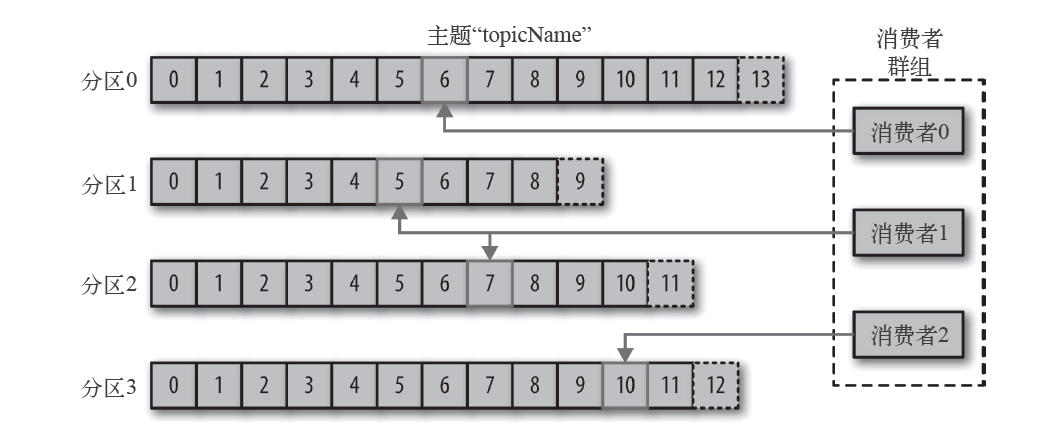
broker and cluster
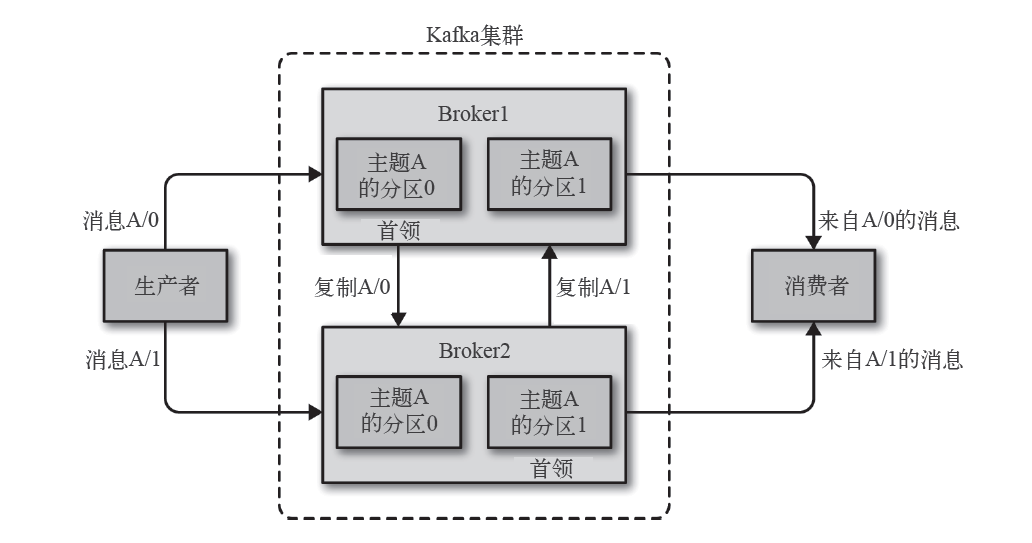
A standalone Kafka server is called a broker; the broker receives messages from producers independently, sets offsets for the messages, saves the messages to disk, and handles consumer requests for partitions, returning messages saved to disk. A single broker can handle thousands of partitions and millions of messages per second.
broker is a component of the Kafka cluster. Each cluster has a broker serving as the cluster controller, managing tasks such as assigning partitions to brokers and monitoring other brokers. In the cluster, one partition belongs to one broker. When a partition is assigned to multiple brokers, this mechanism is called replication, providing message redundancy for the partition. If one broker fails, other brokers can take over leadership; at the same time, consumers and producers need to reconnect to the new leader.
Kafka broker message retention default policy is to retain messages for a certain period of time or until the message size reaches a specific byte threshold. When the message size exceeds these limits, old messages are deleted and removed from disk. Each topic can configure its own retention policy. Based on this mechanism, Kafka allows consumers to read messages from disk in a non-realtime manner.
Multi-cluster
With the increase in the number of Kafka clusters, based on data types for separation, isolation of security requirements, and multi-data center disaster recovery, a multi-cluster solution is recommended. However, Kafka’s message replication mechanism can only be performed within a single cluster and cannot span multiple clusters. To address this, Kafka provides a tool called MirrorMaker, which can be used to achieve message replication between clusters.
Zookeeper
ZooKeeper is a distributed coordination framework responsible for managing and coordinating metadata for Kafka clusters, including active brokers, topics present in the cluster, partitions within each topic, and leaders and followers within partitions.
Kafka uses Zookeeper to maintain cluster member information. Each broker has a unique identifier id, which can be specified in the configuration file or generated automatically. When a broker starts, it registers its id with Zookeeper. Other Kafka components subscribe to the /brokers/ids path in Zookeeper to obtain information about the brokers and their changes. When a broker disconnects from Zookeeper due to a fault, Zookeeper removes the broker’s ephemeral node. Other components that listen for the broker list are notified that the broker is offline. Although the ephemeral node disappears, its id continues to exist in other data structures. A new broker with the same id can immediately join the cluster and have the same topics and partitions after being fully shut down.
2 Producers
In many scenarios, an application needs to write messages into Kafka: logging user activities (for statistics and analysis), recording metrics, saving log messages, asynchronous communication with other applications, caching data to be written into databases, and so on. The variety of use cases leads to diverse requirements, where the importance, latency, and throughput of each message vary. For instance, in a credit card transaction processing system, message loss or duplication is not allowed, and acceptable latency is around 500 ms, while high throughput is required—hundreds of thousands or more messages per second are needed.
On the other hand, for logging website clicks, we can tolerate some message loss or duplication and higher latency, as long as it does not affect the user experience.
The following diagram illustrates the main steps for a producer to send messages to Kafka.
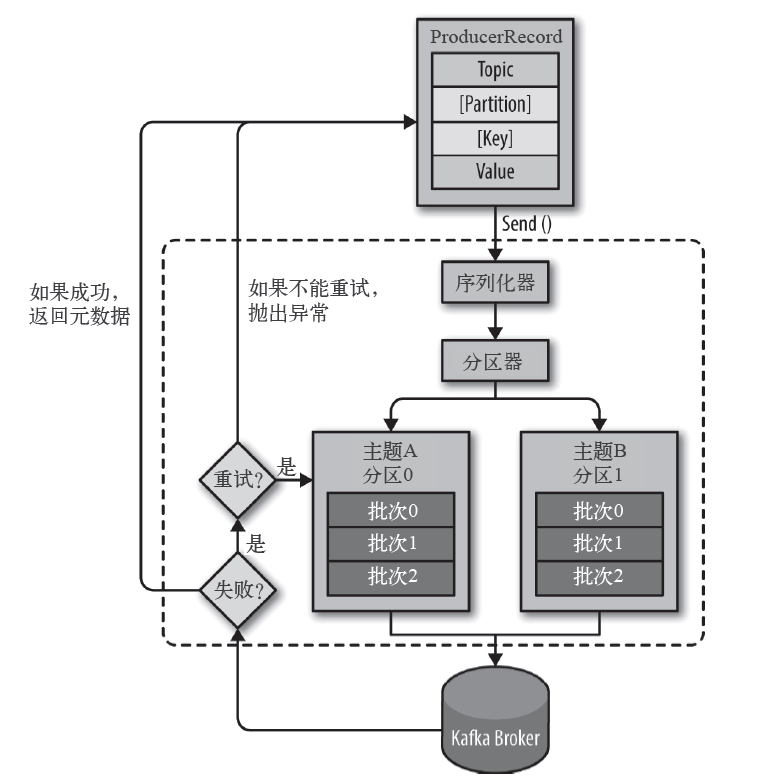
The first step for a producer to send a message is to create a ProducerRecord object; a ProducerRecord must contain the topic and the value to be sent, and optionally the key or partition. Before sending a ProducerRecord, the serializer serializes the key and value into byte arrays.
Next, the data is passed to the partitioner. If a partition is specified in the ProducerRecord object, it will be used directly; otherwise, the partitioner will choose a partition based on the key of the ProducerRecord object. Once the partition is selected, the producer knows which topic and partition to send the message to.
Next, this record is added to a batch, where all messages in the batch are sent to the same topic and partition. The producer uses a separate thread to send the entire batch to the corresponding broker.
The Kafka server returns a response after receiving this batch. If the message is successfully written to Kafka, it returns a RecordMetaData object containing the topic and partition to which the message was sent, along with the offset within the partition. If the write fails, it returns an error. The producer attempts to resend the message upon receiving an error; if it fails multiple times, it returns an error message.
2.1 Serialization Producers
Key and value serializers for the producer KafkaProducer are initialized with different Serializer in its constructor. If the provided Serializer is null, it uses the serializer name configured. Reflection mechanism is utilized to create an object; reflection refers to creating an instance of a type at runtime without knowing anything about it, and then invoking its methods.
public class KafkaProducer<K, V> implements Producer<K, V> {

    KafkaProducer(ProducerConfig config,
                  Serializer<K> keySerializer,
                  Serializer<V> valueSerializer,
                  ProducerMetadata metadata,
                  KafkaClient kafkaClient,
                  ProducerInterceptors<K, V> interceptors,
                  Time time) {
        // ...

python
# key's serializer

            if (keySerializer == null) {
// Use reflection to construct objects of the configuration type.
                this.keySerializer = config.getConfiguredInstance(ProducerConfig.KEY_SERIALIZER_CLASS_CONFIG,
                                                                                         Serializer.class);
                this.keySerializer.configure(config.originals(Collections.singletonMap(ProducerConfig.CLIENT_ID_CONFIG, clientId)), true);
            } else {
                config.ignore(ProducerConfig.KEY_SERIALIZER_CLASS_CONFIG);
                this.keySerializer = keySerializer;
            }
            // value's serializer
            if (valueSerializer == null) {
// Use reflection to construct objects of the configuration type.
                this.valueSerializer = config.getConfiguredInstance(ProducerConfig.VALUE_SERIALIZER_CLASS_CONFIG,
                                                                                           Serializer.class);
                this.valueSerializer.configure(config.originals(Collections.singletonMap(ProducerConfig.CLIENT_ID_CONFIG, clientId)), false);
            } else {
                config.ignore(ProducerConfig.VALUE_SERIALIZER_CLASS_CONFIG);
                this.valueSerializer = valueSerializer;
            }

        // ...
    }

}
For the StringSerializer, which implements the Serializer interface, the serialize function is used for serialization of data. It actually calls the String.getBytes function in Java for string serialization:
public class StringSerializer implements Serializer<String> {
    private String encoding = StandardCharsets.UTF_8.name();

    @Override
    public void configure(Map<String, ?> configs, boolean isKey) {
        String propertyName = isKey ? "key.serializer.encoding" : "value.serializer.encoding";
        Object encodingValue = configs.get(propertyName);
        if (encodingValue == null)
            encodingValue = configs.get("serializer.encoding");
        if (encodingValue instanceof String)
            encoding = (String) encodingValue;
    }

    @Override
    public byte[] serialize(String topic, String data) {
        try {
            if (data == null)
                return null;
            else
                return data.getBytes(encoding);
        } catch (UnsupportedEncodingException e) {
            throw new SerializationException("Error when serializing string to byte[] due to unsupported encoding " + encoding);
        }
    }
}
2.2 Partitioner
Before a producer KafkaProducer sends a message, it invokes the partition method to select the partition that will receive the message. If a partition is specified in the record, it is used directly; otherwise, it invokes the partitioner’s partition method to obtain it.
public class KafkaProducer<K, V> implements Producer<K, V> {

    private int partition(ProducerRecord<K, V> record, byte[] serializedKey, byte[] serializedValue, Cluster cluster) {
        Integer partition = record.partition();
        return partition != null ?
                partition :
                partitioner.partition(
                        record.topic(), record.key(), serializedKey, record.value(), serializedValue, cluster);
    }

}
KafkaProducer uses the default partitioner DefaultPartitioner, which implements the Partitioner interface. The partition method in this implementation is used to implement the logic for distributing partitions:
public class DefaultPartitioner implements Partitioner {

// Maintain a count for each topic.
    private final ConcurrentMap<String, AtomicInteger> topicCounterMap = new ConcurrentHashMap<>();

    public int partition(String topic, Object key, byte[] keyBytes, Object value, byte[] valueBytes, Cluster cluster) {
        List<PartitionInfo> partitions = cluster.partitionsForTopic(topic);
        int numPartitions = partitions.size();
       // key is empty
        if (keyBytes == null) {
           // Obtain the next increment value nextValue
            int nextValue = nextValue(topic);
            List<PartitionInfo> availablePartitions = cluster.availablePartitionsForTopic(topic);
// Mod nextValue by the number of available partitions.
            if (availablePartitions.size() > 0) {
                int part = Utils.toPositive(nextValue) % availablePartitions.size();
                return availablePartitions.get(part).partition();
            } else {
                return Utils.toPositive(nextValue) % numPartitions;
            }
        } else {
           // key IsNot Empty
            return Utils.toPositive(Utils.murmur2(keyBytes)) % numPartitions;
        }
    }

    private int nextValue(String topic) {
        AtomicInteger counter = topicCounterMap.get(topic);
        if (null == counter) {
            counter = new AtomicInteger(ThreadLocalRandom.current().nextInt());
            AtomicInteger currentCounter = topicCounterMap.putIfAbsent(topic, counter);
            if (currentCounter != null) {
                counter = currentCounter;
            }
        }
        return counter.getAndIncrement();
    }

}
This code is divided into two parts:
- When
keyis empty, callnextValueto get an auto-increment value.topicCounterMapis a map for each topic maintaining a counter. Each call tonextValueincrements the counter, and the result is obtained by taking the modulus of the number of partitions. - When
keyis not empty, hash thekeyusing the Murmur2 algorithm to get the result.
It is only when a specific key is provided that a message will be assigned to the same partition, thus being consumed in order.
Kafka 2.4.0 introduces the new sticky partition cache class StickyPartitionCache. When the key is empty, it no longer uses a polling method to allocate partitions but instead calls StickyPartitionCache.partition to retrieve the corresponding partition from the cache:
public class DefaultPartitioner implements Partitioner {

    private final StickyPartitionCache stickyPartitionCache = new StickyPartitionCache();

    public int partition(String topic, Object key, byte[] keyBytes, Object value, byte[] valueBytes, Cluster cluster, int numPartitions) {
       // key is empty
        if (keyBytes == null) {
            return stickyPartitionCache.partition(topic, cluster);
        }
       // key IsNot Empty
        return Utils.toPositive(Utils.murmur2(keyBytes)) % numPartitions;
    }
}

// Implement an inner class for sticky partition caching, tracking each topic's sticky partition.
public class StickyPartitionCache {

// Mapping from topic to partition
    private final ConcurrentMap<String, Integer> indexCache;

    public StickyPartitionCache() {
        this.indexCache = new ConcurrentHashMap<>();
    }

    public int partition(String topic, Cluster cluster) {
        Integer part = indexCache.get(topic);
        if (part == null) {
           // If no cache is available, call `nextPartition` to select a partition and cache it.
            return nextPartition(topic, cluster, -1);
        }
        return part;
    }

    public int nextPartition(String topic, Cluster cluster, int prevPartition) {
        List<PartitionInfo> partitions = cluster.partitionsForTopic(topic);
        Integer oldPart = indexCache.get(topic);
        Integer newPart = oldPart;
// If the current topic does not have a buffer or a new batch is created.
        if (oldPart == null || oldPart == prevPartition) {
            List<PartitionInfo> availablePartitions = cluster.availablePartitionsForTopic(topic);
            if (availablePartitions.size() < 1) {
                Integer random = Utils.toPositive(ThreadLocalRandom.current().nextInt());
                newPart = random % partitions.size();
            } else if (availablePartitions.size() == 1) {
                newPart = availablePartitions.get(0).partition();
            } else {
                while (newPart == null || newPart.equals(oldPart)) {
                    int random = Utils.toPositive(ThreadLocalRandom.current().nextInt());
                    newPart = availablePartitions.get(random % availablePartitions.size()).partition();
                }
            }
           // If topic is not cached
            if (oldPart == null) {
                indexCache.putIfAbsent(topic, newPart);
            } else {
               // If a new cache is created.
                indexCache.replace(topic, prevPartition, newPart);
            }
            return indexCache.get(topic);
        }
        return indexCache.get(topic);
    }

}
StickyPartitionCache class maintains a cache from topic to partition, essentially a round-robin mechanism. In the older version of the partition method, without specifying a key, messages from the same topic would be distributed to different partitions, resulting in many batches and more network requests. StickyPartitionCache, however, ensures that these messages can form a larger batch and be delivered to the same partition, thereby improving throughput.
Consumer
Kafka’s consumer service often performs high-latency I/O operations, such as writing data to disk, database, or HDFS, or performing time-consuming data comparisons. In such cases, a single consumer cannot keep up with the data generation rate, so horizontal scaling is used to add more consumers to distribute the load and increase throughput.
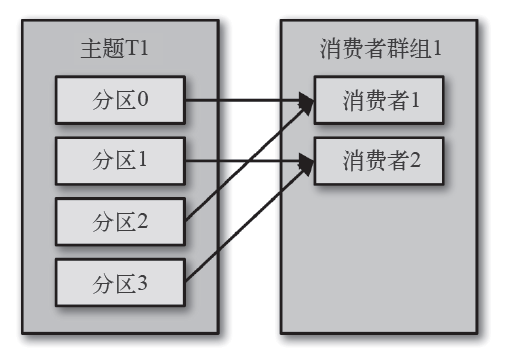
Like multiple producers can write messages to the same topic concurrently, we can also use multiple consumers to subscribe and read messages from the same topic. In Kafka, consumers belong to a consumer group, which subscribes to one topic, and each consumer receives messages from a portion of the partitions.
3.1 Consumption Process
In Kafka, consumer consumption based on the pull model is employed. This approach offers advantages, such as differing consumer capabilities and consumption strategies among clients. They can adjust the pull frequency to match their IO capabilities. However, using the push model might lead to consumer clients crashing due to excessive push speeds.
Consuming messages is a process of continuous polling. Consumers repeatedly call poll and wait for a set of messages from the partitions they are subscribed to on the Kafka server.
public class KafkaConsumerDemo {

    public static void main(String[] args) {
        Properties props = initConfig();
        KafkaConsumer<String, String> consumer = new KafkaConsumer(props);
        consumer.subscribe(Arrays.asList(TOPIC));
        try {
            while (IS_RUNNING.get()) {
                ConsumerRecords<String, String> records = consumer.poll(Duration.ofMillis(1000));
                for (ConsumerRecord<String, String> record : records) {
                    System.out.println("topic=" + record.topic() + ", partition=" + record.partition() + ", offset=" + record.offset());
                    System.out.println("key=" + record.key() + ", value=" + record.value());
                }
            }
        } catch (Exception e) {
            e.printStackTrace();
        } finally {
            consumer.close();
        }
    }

}
poll method returns a ConsumerRecords list, each containing information about the topic and partition of the record, the record’s offset within the partition, and the record’s key-value. The poll method also has a timeout parameter; if no data is available, the execution of poll will immediately return once it exceeds the timeout.
Before the consumer client exits, the close method should be called to shut it down and trigger a rebalance of the group immediately, rather than waiting for the group coordinator to detect the heartbeat timeout and deem the client no longer providing service.
3.2 Offset Management
When the consumer object KafkaConsumerRunner runs, it requests data from the Kafka server by subscribing and polling. Each call to the poll method returns records in the partition that have not been read by the consumer. The consumer tracks the offset of the current partition and updates the offset of the partition through the process of submitting.
If the consumer remains active, offsets lose their significance; however, when a consumer fails or new consumers join the group, a rebalance mechanism is triggered, and each consumer is assigned to a new partition. To continue processing, the consumer needs to read the offset of the last committed record to resume processing from that position. If the last committed offset is either before or after the actual messages being processed, it can lead to message loss or duplication, respectively. Therefore, the submission method becomes crucial.
If the consumer’s processed records and offsets are treated as an atomic operation or transaction and submitted to another database, we can rely on the Kafka server’s offsets and directly use the seek method to fetch messages at a specific offset position upon consumer startup or assignment to a new partition.
Automatic Offset Submission
The simplest approach is to have the consumer automatically submit offsets. Under default conditions, the consumer will automatically submit the maximum offset received via poll every 5 seconds.
Using automatic commit introduces potential risks. Suppose during an automatic commit interval, the group rebalances. After rebalancing completes, the consumer may receive offsets that are behind the actual message processing positions. Some messages could thus be duplicated. Although reducing the commit interval to more frequently commit offsets can decrease the number of duplicated messages, this is unavoidable.
Synchronized Submission
Through the call to KafkaConsumer.commitSync, offsets can be committed synchronously. No parameters are passed, and the maximum offset to be committed is submitted by default.
public class KafkaConsumer<K, V> implements Consumer<K, V> {

    public void commitSync(final Map<TopicPartition, OffsetAndMetadata> offsets, final Duration timeout) {
        acquireAndEnsureOpen(); // Acquire the light lock and ensure that the consumer hasn't been closed.
        long commitStart = time.nanoseconds();
        try {
            maybeThrowInvalidGroupIdException();
            offsets.forEach(this::updateLastSeenEpochIfNewer);
           // coordinator manages the submission process of consumers.
            if (!coordinator.commitOffsetsSync(new HashMap<>(offsets), time.timer(timeout))) {
                throw new TimeoutException("Timeout of " + timeout.toMillis() + "ms expired before successfully " +
                        "committing offsets " + offsets);
            }
        } finally {
            kafkaConsumerMetrics.recordCommitSync(time.nanoseconds() - commitStart);
            release();
        }
    }

    private void acquireAndEnsureOpen() {
        acquire();
        if (this.closed) {
            release();
            throw new IllegalStateException("This consumer has already been closed.");
        }
    }

}
acquireAndEnsureOpen attempts to acquire a lock and ensures that the current client is not closed. However, KafkaConsumer does not support concurrent access, so it simply throws a state error exception when called by multiple threads.
public final class ConsumerCoordinator extends AbstractCoordinator {

    public boolean commitOffsetsSync(Map<TopicPartition, OffsetAndMetadata> offsets, Timer timer) {
        invokeCompletedOffsetCommitCallbacks();

        if (offsets.isEmpty())
            return true;

        do {
            if (coordinatorUnknown() && !ensureCoordinatorReady(timer)) {
                return false;
            }

            RequestFuture<Void> future = sendOffsetCommitRequest(offsets);

           //  Blocking wait for submission results.
            client.poll(future, timer);

            invokeCompletedOffsetCommitCallbacks();

            if (future.succeeded()) {
                if (interceptors != null)
                    interceptors.onCommit(offsets);
                return true;
            }

            if (future.failed() && !future.isRetriable())
                throw future.exception();

            timer.sleep(rebalanceConfig.retryBackoffMs);
        } while (timer.notExpired());

        return false;
    }

}
ConsumerCoordinator.commitOffsetsSync first obtains a future object after sending a sendOffsetCommitRequest. It then blocks using poll(future) to wait for its execution to complete; if a synchronous commit fails but is not yet timed out, it attempts to re-submit the commit in the recommitOffsetsAsync function in an attempt to ensure data submission success, albeit at the cost of reduced program throughput.
Asynchronous Submission
In contrast to synchronous submission, asynchronous submission does not block the consumer thread during execution. This allows for improved performance and throughput of the consumer client, without the need for blocking.
public class KafkaConsumer<K, V> implements Consumer<K, V> {

    public void commitAsync(final Map<TopicPartition, OffsetAndMetadata> offsets, OffsetCommitCallback callback) {
        acquireAndEnsureOpen();
        try {
            maybeThrowInvalidGroupIdException();
            log.debug("Committing offsets: {}", offsets);
            offsets.forEach(this::updateLastSeenEpochIfNewer);
            coordinator.commitOffsetsAsync(new HashMap<>(offsets), callback);
        } finally {
            release();
        }
    }

}
Compared to the synchronous submission commitSync, the asynchronous submission commitAsync has a unique difference in its parameters, which includes an additional callback function.
public final class ConsumerCoordinator extends AbstractCoordinator {

	private void doCommitOffsetsAsync(final Map<TopicPartition, OffsetAndMetadata> offsets, final OffsetCommitCallback callback) {
        this.subscriptions.needRefreshCommits();
        RequestFuture<Void> future = sendOffsetCommitRequest(offsets);
        final OffsetCommitCallback cb = callback == null ? defaultOffsetCommitCallback : callback;
       // Add listener
        future.addListener(new RequestFutureListener<Void>() {
            @Override
            public void onSuccess(Void value) {
                if (interceptors != null)
                    interceptors.onCommit(offsets);

                completedOffsetCommits.add(new OffsetCommitCompletion(cb, offsets, null));
            }

            @Override
            public void onFailure(RuntimeException e) {
                Exception commitException = e;

                if (e instanceof RetriableException)
                    commitException = RetriableCommitFailedException.withUnderlyingMessage(e.getMessage());

                completedOffsetCommits.add(new OffsetCommitCompletion(cb, offsets, commitException));
            }
        });
    }

}
3.3 Rebalance
Rebalance occurs when a partition’s ownership is transferred from one consumer to another, providing high availability and scalability for the group. It triggers under the following conditions:
- A new partition is added to a topic that the group is subscribed to.
- Some consumers are added or removed from the group, requiring the redistribution of the corresponding partitions among the remaining consumers.
- The topic the group is subscribed to changes, such as when the group subscribes to a topic using a regular expression (e.g., “test.*”), and a new topic matching the regular expression is added to the cluster (e.g., “test1”), then all partitions of this topic are redistributed to the group.
During the period of rebalance, the entire group is unavailable for reading messages; and when a partition is reassigned to a different consumer, the consumer’s state is lost, i.e., its offset may not have been committed. Therefore, unnecessary rebalances should generally be avoided.
RangeAssignor
RangeAssignor is the default and simplest rebalance strategy.
public class RangeAssignor extends AbstractPartitionAssignor {
    public static final String RANGE_ASSIGNOR_NAME = "range";

    @Override
    public Map<String, List<TopicPartition>> assign(Map<String, Integer> partitionsPerTopic,
                                                    Map<String, Subscription> subscriptions) {
        Map<String, List<MemberInfo>> consumersPerTopic = consumersPerTopic(subscriptions);

        Map<String, List<TopicPartition>> assignment = new HashMap<>();
        for (String memberId : subscriptions.keySet())
            assignment.put(memberId, new ArrayList<>());

        for (Map.Entry<String, List<MemberInfo>> topicEntry : consumersPerTopic.entrySet()) {
            String topic = topicEntry.getKey();
            List<MemberInfo> consumersForTopic = topicEntry.getValue();

// Number of partitions per topic
            Integer numPartitionsForTopic = partitionsPerTopic.get(topic);
            if (numPartitionsForTopic == null)
                continue;

            Collections.sort(consumersForTopic);

// The number of partitions each consumer will be assigned to
            int numPartitionsPerConsumer = numPartitionsForTopic / consumersForTopic.size();
// Partitions to which some consumers will be assigned additional
            int consumersWithExtraPartition = numPartitionsForTopic % consumersForTopic.size();

            List<TopicPartition> partitions = AbstractPartitionAssignor.partitions(topic, numPartitionsForTopic);
            for (int i = 0, n = consumersForTopic.size(); i < n; i++) {
                int start = numPartitionsPerConsumer * i + Math.min(i, consumersWithExtraPartition);
                int length = numPartitionsPerConsumer + (i + 1 > consumersWithExtraPartition ? 0 : 1);
                assignment.get(consumersForTopic.get(i).memberId).addAll(partitions.subList(start, start + length));
            }
        }
        return assignment;
    }
}
One can see that the RangeAssignor.assign function computes the integer division result numPartitionsPerConsumer and the remainder consumersWithExtraPartition between the number of partitions numPartitionsForTopic and the number of consumers consumersForTopic. It then assigns consecutive partitions to the same consumer.
RoundRobinAssignor
The principle of the RoundRobinAssignor strategy is to sort all consumers and all partitions within the group in dictionary order, and then allocate them in a round-robin manner:
public class RoundRobinAssignor extends AbstractPartitionAssignor {
    public static final String ROUNDROBIN_ASSIGNOR_NAME = "roundrobin";

    @Override
    public Map<String, List<TopicPartition>> assign(Map<String, Integer> partitionsPerTopic,
                                                    Map<String, Subscription> subscriptions) {
        Map<String, List<TopicPartition>> assignment = new HashMap<>();
        List<MemberInfo> memberInfoList = new ArrayList<>();
        for (Map.Entry<String, Subscription> memberSubscription : subscriptions.entrySet()) {
            assignment.put(memberSubscription.getKey(), new ArrayList<>());
            memberInfoList.add(new MemberInfo(memberSubscription.getKey(),
                                              memberSubscription.getValue().groupInstanceId()));
        }

       // Circular linked list, storing all consumers
        CircularIterator<MemberInfo> assigner = new CircularIterator<>(Utils.sorted(memberInfoList));

// Get all partitions that group currently subscribes to for topic `group`.
        for (TopicPartition partition : allPartitionsSorted(partitionsPerTopic, subscriptions)) {
            final String topic = partition.topic();
            while (!subscriptions.get(assigner.peek().memberId).topics().contains(topic))
                assigner.next();
            assignment.get(assigner.next().memberId).add(partition);
        }
        return assignment;
    }

}
Above both methods perform a full redistribution of all partitions.
StickyAssignor
The purpose of the StickyAssignor strategy is twofold:
- The allocation of partitions should be as uniform as possible, with the maximum difference in the number of partitions allocated to each consumer being one;
- The allocation of partitions should be as consistent as possible with the previous redistribution;
In case of conflict between the two goals, the first goal takes precedence over the second.
public abstract class AbstractStickyAssignor extends AbstractPartitionAssignor {

        public Map<String, List<TopicPartition>> assign(Map<String, Integer> partitionsPerTopic,
                                                    Map<String, Subscription> subscriptions) {
        Map<String, List<TopicPartition>> consumerToOwnedPartitions = new HashMap<>();
        Set<TopicPartition> partitionsWithMultiplePreviousOwners = new HashSet<>();
        if (allSubscriptionsEqual(partitionsPerTopic.keySet(), subscriptions, consumerToOwnedPartitions, partitionsWithMultiplePreviousOwners)) {
            log.debug("Detected that all consumers were subscribed to same set of topics, invoking the "
                          + "optimized assignment algorithm");
            partitionsTransferringOwnership = new HashMap<>();
            return constrainedAssign(partitionsPerTopic, consumerToOwnedPartitions, partitionsWithMultiplePreviousOwners);
        } else {
            log.debug("Detected that not all consumers were subscribed to same set of topics, falling back to the "
                          + "general case assignment algorithm");
            partitionsTransferringOwnership = null;
            return generalAssign(partitionsPerTopic, subscriptions, consumerToOwnedPartitions);
        }
    }

}
In the assign function of the abstract base class AbstractStickyAssignor, rebalancing is divided into two cases: one where consumers within a group subscribe to the same topic, and another where they subscribe to different topics.
For the former, we need to retrieve the previous allocation status and delete expired partitions to obtain a pre-allocation list as similar as possible to the previous one, though it may not be evenly distributed. Thus, we proceed to the constrainedAssign function for further equitable allocation.
public abstract class AbstractStickyAssignor extends AbstractPartitionAssignor {

    private Map<String, List<TopicPartition>> constrainedAssign(Map<String, Integer> partitionsPerTopic,
                                                                Map<String, List<TopicPartition>> consumerToOwnedPartitions,
                                                                Set<TopicPartition> partitionsWithMultiplePreviousOwners) {
        // ...

       // Consumer count
        int numberOfConsumers = consumerToOwnedPartitions.size();
// Number of partitions
        int totalPartitionsCount = partitionsPerTopic.values().stream().reduce(0, Integer::sum);

// The minimum number of partitions each consumer is allocated to.
        int minQuota = (int) Math.floor(((double) totalPartitionsCount) / numberOfConsumers);
// Maximum number of partitions each consumer is assigned to
        int maxQuota = (int) Math.ceil(((double) totalPartitionsCount) / numberOfConsumers);

// Would receive the number of consumers with additional partitions.
        int expectedNumMembersWithOverMinQuotaPartitions = totalPartitionsCount % numberOfConsumers;

        // ...

// Validate the pre-allocated quantity and remove any excess beyond `minQuota` and `maxQuota`, moving the excess to consumers below `minQuota`. Note that this step can only extract all excess quantities.
        for (Map.Entry<String, List<TopicPartition>> consumerEntry : consumerToOwnedPartitions.entrySet()) {
            List<TopicPartition> ownedPartitions = consumerEntry.getValue();

           // For consumers that did not meet the `minQuota` when pre-allocated, allocate the excess to them.
            if (ownedPartitions.size() < minQuota) {
                if (ownedPartitions.size() > 0) {
                    consumerAssignment.addAll(ownedPartitions);
                    assignedPartitions.addAll(ownedPartitions);
                }
                unfilledMembersWithUnderMinQuotaPartitions.add(consumer);
} else if (ownedPartitions.size() >= maxQuota && currentNumMembersWithOverMinQuotaPartitions < expectedNumMembersWithOverMinQuotaPartitions) { // For consumers exceeding maxQuota during allocation, remove the excess and save them.
                currentNumMembersWithOverMinQuotaPartitions++;
                if (currentNumMembersWithOverMinQuotaPartitions == expectedNumMembersWithOverMinQuotaPartitions) {
                    unfilledMembersWithExactlyMinQuotaPartitions.clear();
                }
                List<TopicPartition> maxQuotaPartitions = ownedPartitions.subList(0, maxQuota);
                consumerAssignment.addAll(maxQuotaPartitions);
                assignedPartitions.addAll(maxQuotaPartitions);
                allRevokedPartitions.addAll(ownedPartitions.subList(maxQuota, ownedPartitions.size()));
} else { // For consumers that have exactly the allocated `minQuota`, if there are remaining partitions to allocate, allocate one to them.
                List<TopicPartition> minQuotaPartitions = ownedPartitions.subList(0, minQuota);
                consumerAssignment.addAll(minQuotaPartitions);
                assignedPartitions.addAll(minQuotaPartitions);
                allRevokedPartitions.addAll(ownedPartitions.subList(minQuota, ownedPartitions.size()));
// If not allocated, record it.
                if (currentNumMembersWithOverMinQuotaPartitions < expectedNumMembersWithOverMinQuotaPartitions) {
                    unfilledMembersWithExactlyMinQuotaPartitions.add(consumer);
                }
            }
        }

// Using polling method, then distribute any excess quota to consumers that have not reached the minQuota.
        Iterator<String> unfilledConsumerIter = unfilledMembersWithUnderMinQuotaPartitions.iterator();
        for (TopicPartition unassignedPartition : unassignedPartitions) {
            // ...

            unfilledConsumerIter = unfilledMembersWithUnderMinQuotaPartitions.iterator();
            consumer = unfilledConsumerIter.next();

            int currentAssignedCount = consumerAssignment.size();
            if (currentAssignedCount == minQuota) {
                unfilledConsumerIter.remove();
                unfilledMembersWithExactlyMinQuotaPartitions.add(consumer);
            }

            // ...
        }

        // ...
    }

}
4 Server
4.1 Copy and Copies
Replication is the core mechanism in the Kafka server architecture that ensures data redundancy, high scalability, and automatic fault transfer. Each topic in a Kafka server is divided into several partitions, with each partition having n replicas, where n represents the replication factor of the topic.
Replicas are divided into two types: a Leader, where each partition has exactly one leader. To ensure data consistency, all requests from producers and consumers are directed towards the leader. The other type is a Follower, whose primary function is data backup. Each partition, apart from the leader, contains one or more followers. Followers do not handle any requests; they only send pull requests to the leader (similar to consumer clients) for replication and maintain consistency with the leader. If the leader fails, one of the followers is promoted to a new leader.
For clients, follower has no meaning. Unlike MySQL, they cannot help leader bear read loads or achieve read-locality improvement. The reasons are twofold: first, to implement RyW (read your write)/WfR (write follow read), i.e., each write operation depends on the previous read operation to avoid dirty reads, solving consistency issues at the sticky session level; second, to achieve monotonic reads, i.e., after reading a value, all subsequent reads must read that value or a later update.
Data Consistency
Generally, there are two approaches to ensure strong consistency of data: primary-backup replication and quorum-based replication.
Distributed replication generally employs consensus algorithms such as Paxos and Raft for implementation. Its characteristic is that it can tolerate up to ( n ) failures with ( 2n + 1 ) nodes. One of its advantages is lower latency (as only successful writes from a portion of nodes are required). While master-slave replication requires waiting for all nodes to successfully write, with n nodes in place, it can tolerate up to n-1 node failures. Its advantage lies in its ability to tolerate more node failures (as long as one node remains operational), and it can provide service as long as there are at least two nodes operational, whereas the former requires at least three nodes.
Kafka uses the master-slave replication model to replicate logs between clusters. Each replica maintains a log on disk. They sequentially append received logs to their logs. When a producer pushes a message to a specific partition, it is first forwarded to the leader of that partition. The leader appends the message to the disk log and continuously requests and synchronizes this message from all other followers on the same partition. Only after a sufficient number of followers successfully process the message does the leader consider the message handled; however, if the leader waits for all followers to complete processing, it will increase system latency and reduce service availability.
ISR
To address the issue where followers need to process messages after completing them, Kafka introduced the concept of ISR In-Sync Replica. All replicas for a given partition are collectively referred to as Assigned Replicas (AR). The replicas that maintain a certain level of synchronization with the leader form the ISR In-Sync Replicas (ISR). ISR is a subset of AR, and ISR includes the leader. After receiving a message from a producer, a follower can fetch messages from the leader for synchronization. During this period, followers may lag behind the leader to some extent. This lag is referred to as “some extent,” which can be adjusted by modifying the configuration. Replicas that lag too much beyond this threshold are categorized as Out-Sync Replicas (OSR). Under normal circumstances, all followers should maintain some level of synchronization with the leader, i.e., AR = ISR, OSR = Ø. Leader maintains and tracks the lag status of all followers. When a follower is too far behind or fails, it is removed from the ISR (In-Sync Replicas) set. If followers in the OSR (Out-Sync Replicas) set catch up with the leader, it is added to the ISR set. Only followers in the ISR set are eligible to be elected as the leader. However, if the ISR set becomes empty due to the failure of the leader and no other follower matches the leader’s previous state, the configuration can be modified to enable Unclean Leader Election, allowing any follower in the OSR set to become the new leader. This may lead to duplicate consumption of data but ensures that at least one leader is available for the partition, thereby improving high availability. In this area, Kafka grants developers the choice between consistency and availability in the CAP theory.
Partition Assignment
When creating a topic, the Kafka server decides how to distribute replicas among brokers with the following goals:
- Distribute replicas as evenly as possible across brokers.
- Ensure that each replica is distributed across different brokers.
- If broker is specified with rack information, try to place each replica on a broker in a different rack to ensure that a single rack failure does not render an entire partition unavailable. Here is the allocation process:
…
object AdminUtils extends Logging {

  def assignReplicasToBrokers(brokerMetadatas: Iterable[BrokerMetadata],
                              nPartitions: Int,
                              replicationFactor: Int,
                              fixedStartIndex: Int = -1,
                              startPartitionId: Int = -1): Map[Int, Seq[Int]] = {
    if (nPartitions <= 0)
      throw new InvalidPartitionsException("Number of partitions must be larger than 0.")
    if (replicationFactor <= 0)
      throw new InvalidReplicationFactorException("Replication factor must be larger than 0.")
    if (replicationFactor > brokerMetadatas.size)
      throw new InvalidReplicationFactorException(s"Replication factor: $replicationFactor larger than available brokers: ${brokerMetadatas.size}.")
// No Rack Specified
    if (brokerMetadatas.forall(_.rack.isEmpty))
      assignReplicasToBrokersRackUnaware(nPartitions, replicationFactor, brokerMetadatas.map(_.id), fixedStartIndex,
        startPartitionId)
    else {
      if (brokerMetadatas.exists(_.rack.isEmpty))
        throw new AdminOperationException("Not all brokers have rack information for replica rack aware assignment.")
// Specify Rack
      assignReplicasToBrokersRackAware(nPartitions, replicationFactor, brokerMetadatas, fixedStartIndex,
        startPartitionId)
    }
  }

// No Rack Specified
  private def assignReplicasToBrokersRackUnaware(nPartitions: Int,
                                                 replicationFactor: Int,
                                                 brokerList: Iterable[Int],
                                                 fixedStartIndex: Int,
                                                 startPartitionId: Int): Map[Int, Seq[Int]] = {
    val ret = mutable.Map[Int, Seq[Int]]()
    val brokerArray = brokerList.toArray
// Randomly select a broker as the starting position startIndex
    val startIndex = if (fixedStartIndex >= 0) fixedStartIndex else rand.nextInt(brokerArray.length)
// CURRENT_PARTITION_ID is set to 0.
    var currentPartitionId = math.max(0, startPartitionId)
// Randomly select broker displacement
    var nextReplicaShift = if (fixedStartIndex >= 0) fixedStartIndex else rand.nextInt(brokerArray.length)
    for (_ <- 0 until nPartitions) {
// After traversing the number of partitions for each broker, increment the offset.
      if (currentPartitionId > 0 && (currentPartitionId % brokerArray.length == 0))
        nextReplicaShift += 1
// Current partition ID plus the start position modulo brokersize gives the position of the first replica.
      val firstReplicaIndex = (currentPartitionId + startIndex) % brokerArray.length
      val replicaBuffer = mutable.ArrayBuffer(brokerArray(firstReplicaIndex))
      for (j <- 0 until replicationFactor - 1)
// Calculate the positions of each replica.
        replicaBuffer += brokerArray(replicaIndex(firstReplicaIndex, nextReplicaShift, j, brokerArray.length))
      ret.put(currentPartitionId, replicaBuffer)
// Partition ID Increment
      currentPartitionId += 1
    }
    ret
  }

}
4.2 Message Processing
Kafka servers process messages using a Reactor model. The Reactor model is an implementation of an event-driven architecture, suitable for handling multiple clients concurrently sending requests to the server. Multiple clients send requests to the Reactor, which then dispatches these requests to multiple worker threads, worker thread, for processing by the acceptor threads.
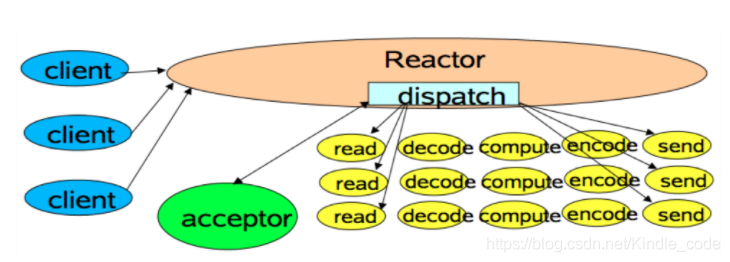
The broker has a SocketServer component, akin to the Dispatcher in the Reactor pattern, including the corresponding Acceptor thread and a thread pool for handling tasks (referred to as the “network thread pool” in Kafka, with a default value of 3 threads). The Acceptor thread distributes traffic fairly among all network threads using a round-robin approach, avoiding request processing skew and facilitating a more equitable request dispatching.
4.3 Physical Storage
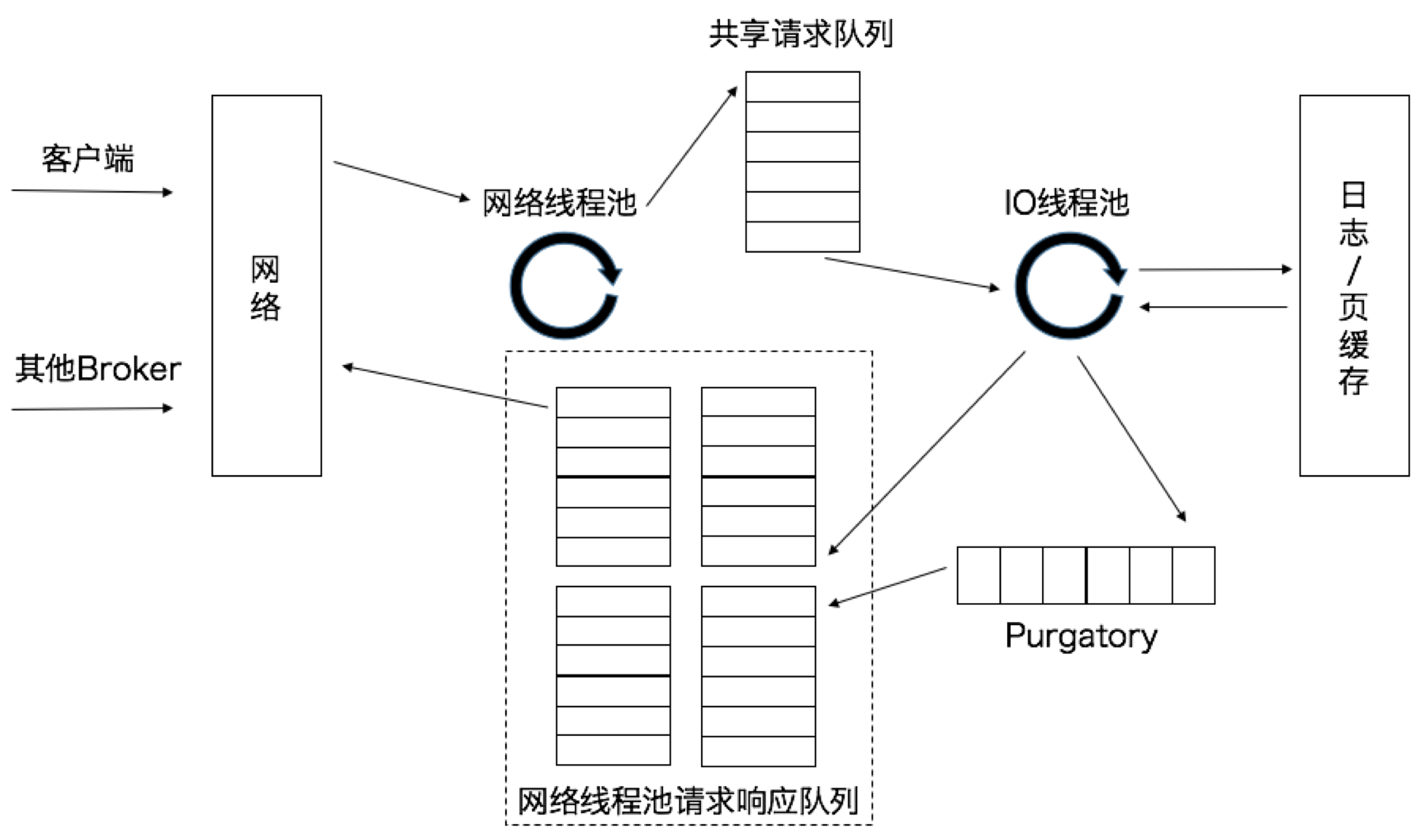
Network threads receive requests and do not process them immediately but instead place them in a shared request queue. Subsequently, the IO thread pool (defaulting to 8 threads) retrieves requests from the shared request queue and executes the actual processing. If the request is a push request sent by a producer, the message is written to the underlying disk log. If the request is a pull request sent by a consumer, the message is read from the disk or page cache. After processing the request, the IO thread sends the generated response to the response queue of the corresponding network thread, which then returns the response to the client. The request queue is shared among all network threads, whereas the response queue is exclusive to each network thread. There is a Purgatory component between the IO thread pool and the response queue to buffer delayed requests.
4.3 Physical Storage
Network threads receive requests and do not process them immediately but instead place them in a shared request queue. Subsequently, the IO thread pool (defaulting to 8 threads) retrieves requests from the shared request queue and executes the actual processing. If the request is a push request sent by a producer, the message is written to the underlying disk log. If the request is a pull request sent by a consumer, the message is read from the disk or page cache. After processing the request, the IO thread sends the generated response to the response queue of the corresponding network thread, which then returns the response to the client. The request queue is shared among all network threads, whereas the response queue is exclusive to each network thread. There is a Purgatory component between the IO thread pool and the response queue to buffer delayed requests.
4.3 File Management
We can configure different retention policies for each topic to specify how long data can be retained before being deleted or how much data can be retained before being purged.
Because searching and deleting messages from a large file is time-consuming, we split each partition into several segments. By default, each segment contains 1GB or a week’s worth of data (the smaller of the two). When a broker writes data to a partition, if the current segment reaches its limit, it closes the current file and opens a new one for writing. The segment currently being written to is called the active segment. The active segment will never be deleted.
A segment consists of an index file and a data file, which are paired and have the suffixes .index and .log, respectively. The naming convention for these files is that the first segment of a partition starts from 0, and subsequent segments are the offset of the last message in the previous segment.
$ ll
0000000000000000000.index
0000000000000000000.log
0000000000000368769.ndex
0000000000000368769.log
0000000000000737337.index
0000000000000737337.log
0000000000001105814.index
0000000000001105814.log
The broker maintains a file handle for each segment, even for inactive segments.
Because the data format saved in segment is consistent with both the format of data sent by the producer and the format of data sent to the consumer, zero-copy technology can be used to copy the data into the page cache. This avoids decompressing and re-compressing messages that have already been compressed by the producer. Additionally, receiving data does not require waiting for the data to be written to disk; instead, it confirms that the data has been written to the page cache. Subsequently, the operating system will periodically write dirty data in the page cache to physical disk based on the Least Recently Used (LRU) algorithm. The interval for this periodic action is determined by the submission time, with a default interval of 5 seconds.
File Compression
Log compression is a premium feature of Kafka, as this feature allows Kafka to store data for a long time.
Apart from the key, value, and offset, the messages sent by the producer also include information such as message size, checksum, version number of the message format, compression algorithm, and timestamp. The timestamp can either be the time when the producer sent the message, or the time when the message arrived at the broker (configurable). If the producer sends compressed messages, these messages are bundled together as a single wrapper message within the same batch. Subsequently, the broker forwards this message group to the consumer.
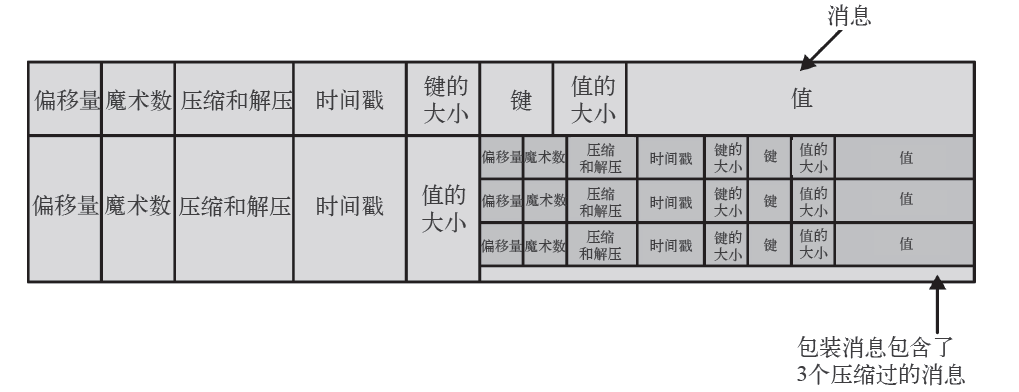
Kafka constructs messages as recursive patterns, with the outer layer wrapping a message whose value is a collection of messages, referred to as the inner message. The outer layer may contain multiple messages, each of which wraps multiple inner messages. A compression method is specified for the outer layer, and the inner messages are then decompressed using this method.
5 Multi-cluster
In Kafka, data replication between clusters is called mirroring, and the built-in cross-cluster replication tool is called MirrorMaker.
Application Scenarios
Below are some Kafka cross-cluster application scenarios:
- Zone Cluster and Central Cluster
A company may have multiple data centers, each located in different geographical regions. Each of these data centers has its own Kafka cluster. Some services need to access data from multiple data centers.
- Data Redundancy
Although a single Kafka cluster is sufficient to support all applications, the entire cluster could become unavailable for some reason.
Migration to the Cloud
Mirror of Apache Kafka - GitHub
The authoritative guide to Apache Kafka is available at https://book.douban.com/subject/27665114/
Intensive Understanding of Kafka
Practical Kafka with Apache Kafka
Kafka Partition Mechanism Generated Message Push and Consumption Logic