LeetCode Archiver (1): Scrapy and Requests
Originally published in Chinese on 2018-12-04; this English edition preserves the original scope and technical context.
Introduction
The official Scrapy documentation introduces Scrapy as follows:
Scrapy is an application framework written to crawl website data and extract structured data. It can be used in a series of programs including data mining, information processing or storing historical data.
It was originally designed for page scraping (more specifically, web scraping), but can also be used to obtain data returned by APIs (such as Amazon Associates Web Services) or general web crawlers.
In short, Scrapy is a Python crawler framework developed based on the Twisted library that encapsulates http requests, proxy information, data storage and other functions.
Components and data flows
The following figure is an overview of the architecture in Scrapy’s official documentation:
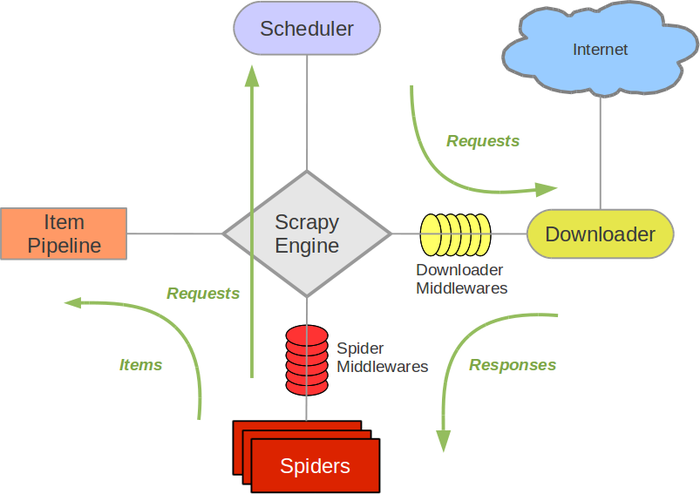
The green arrow in the figure represents data flow, and the others are components.
Scrapy Engine
The engine is responsible for controlling the flow of data through the components of the system and triggering events when corresponding actions occur.
Scheduler
The scheduler receives the request from the engine and saves it to provide it to the engine when requested.
Downloader
The downloader is responsible for downloading the page data and providing it to the engine, which then provides it to the crawler.
Spiders (crawlers)
Spider is a class written by users to analyze responses and extract items or additional follow-up URLs. There can be many spiders in a Scrapy project, and they are used to crawl different pages and websites.
Item Pipeline
The Item Pipeline is responsible for processing the items extracted by the crawler**. It can be data cleaned, validated and persisted (e.g. stored in a database).
Downloader middlewares (Downloader middleware)
Downloader middleware is a component between the engine and the downloader, used to process the response passed by the downloader to the engine. For more information, please refer to Downloader Middleware.
Spider middlewares (crawler middleware)
Spider middleware is a component between the engine and Spider, used to process the crawler’s input (response) and output (items and requests). For more information, please refer to Crawler Middleware.
Data flow
The data flow in Scrapy is controlled by the engine, and the process is as follows:
- The engine opens a website, finds the crawler that processes the website and requests the crawler for the URL to be crawled.
- The engine obtains the URL to be crawled from the crawler and sends it to the scheduler as a request.
- The engine requests the scheduler for the next URL to be crawled.
- The scheduler returns the next URL to be crawled to the engine, and the engine sends the URL to the downloader through the downloader middleware.
- After the downloader successfully downloads the page, it generates a response object of the page and sends it to the engine through the downloader middleware.
- The engine receives the response sent from the downloader middleware and sends it to the crawler for processing through the crawler middleware.
- The crawler processes the response and sends the crawled items and subsequent new requests to the engine.
- The engine sends the items returned by the crawler to the pipeline, and sends the new request returned by the crawler to the scheduler.
- The pipeline processes the item accordingly.
- Repeat the second step until there are no more requests in the scheduler, at which time the engine closes the website.
Installation
Download and install the latest version of Python3
Install Scrapy using pip command
pip3 install scrapy
Create project
First go to your code storage directory and enter the following command on the command line:
scrapy startproject LeetCode_Crawler
Note that the project name cannot contain the hyphen ‘-’
After the creation is successful, you can see that a new Scrapy project named LeetCode_Crawler has been created in the current directory. Enter the directory. The project structure is as follows:
scrapy.cfg              #Configuration file for this project
scrapy_project          #of the projectPythonmodule
    __init__.py
    items.py            #Customizableitemclass file
    middlewares.py      #middleware file
    pipelines.py        #pipeline file
    settings.py         #settings file
    __pycache__
    spiders             #Crawler folder, all crawler files should be under this folder
        __init__.py
        __pycache__
At this point, the creation of the Scrapy project is complete.